

Summary
AxelTech SocialHub is a software-based solution that retrieves social network messages and texts from mobile phones, organizes them for DJs and TV presenters, and sends them to character generator (CG) software for on-air display. The software is designed for radio stations, TV channels, music television programs, and sports channels where audience engagement through social media is critical. SocialHub manages accounts from multiple social networks simultaneously, catalogues incoming content, and gives users full flexibility to edit and select which messages are most suitable for broadcasting.AxelTech SocialHub Screenshots
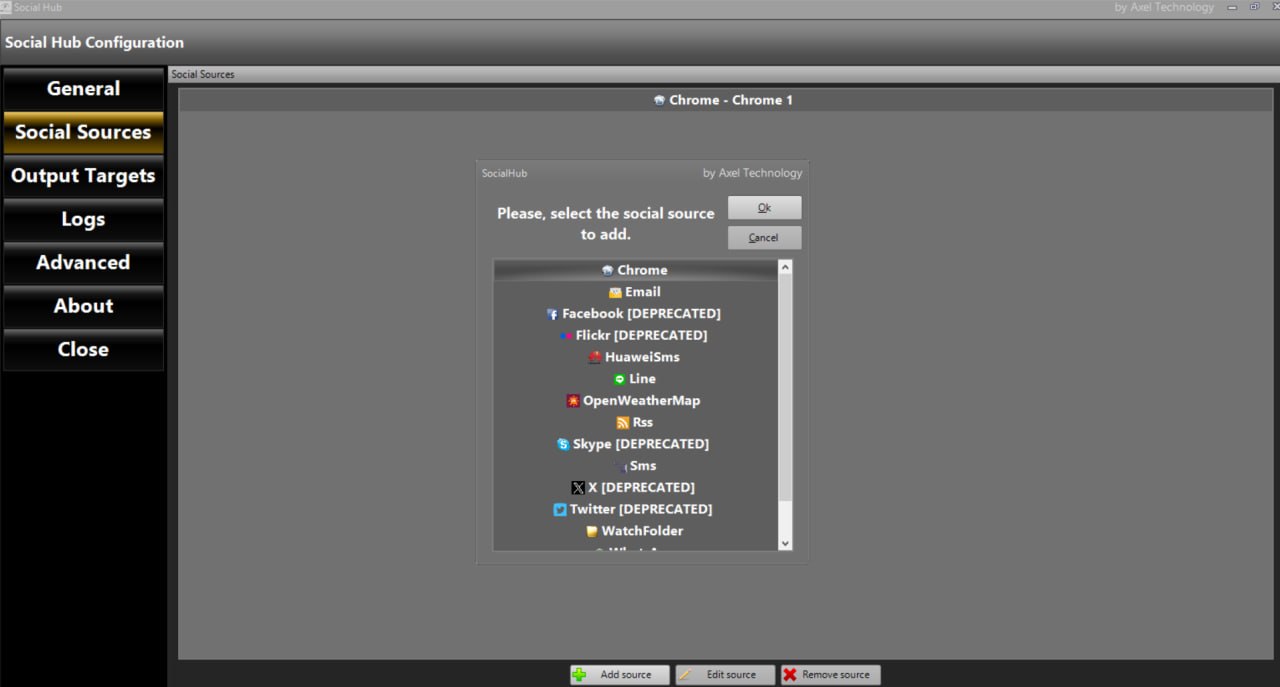
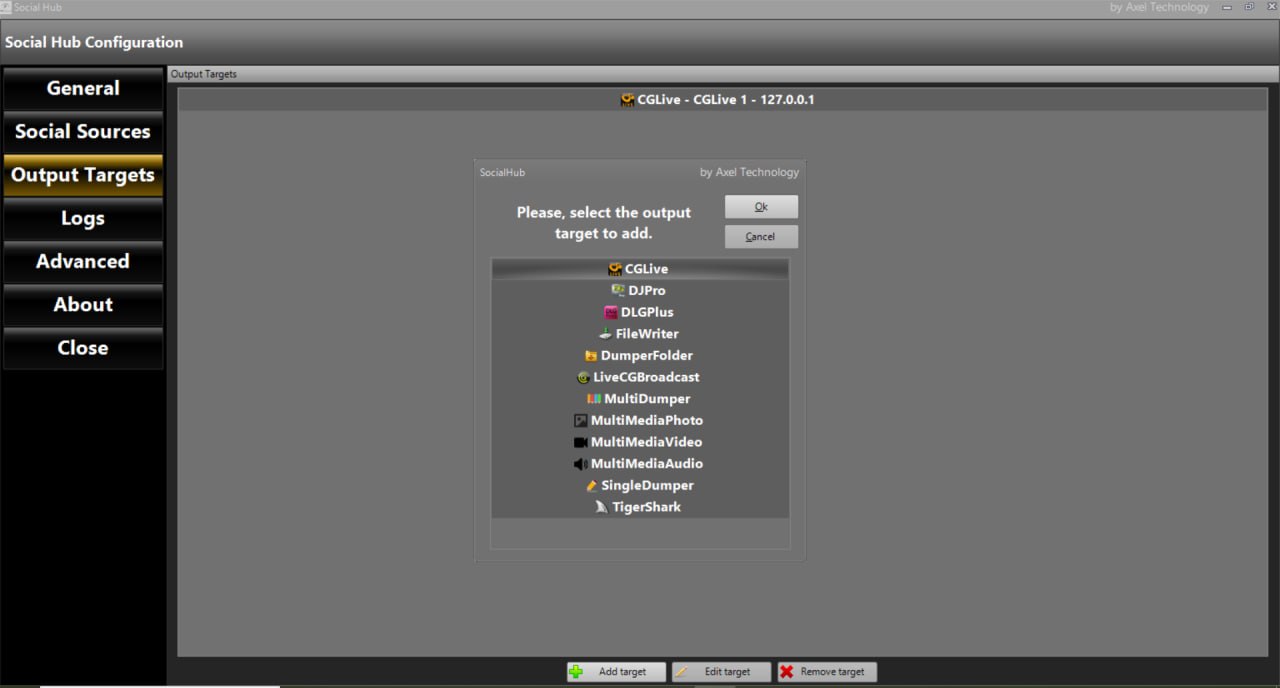
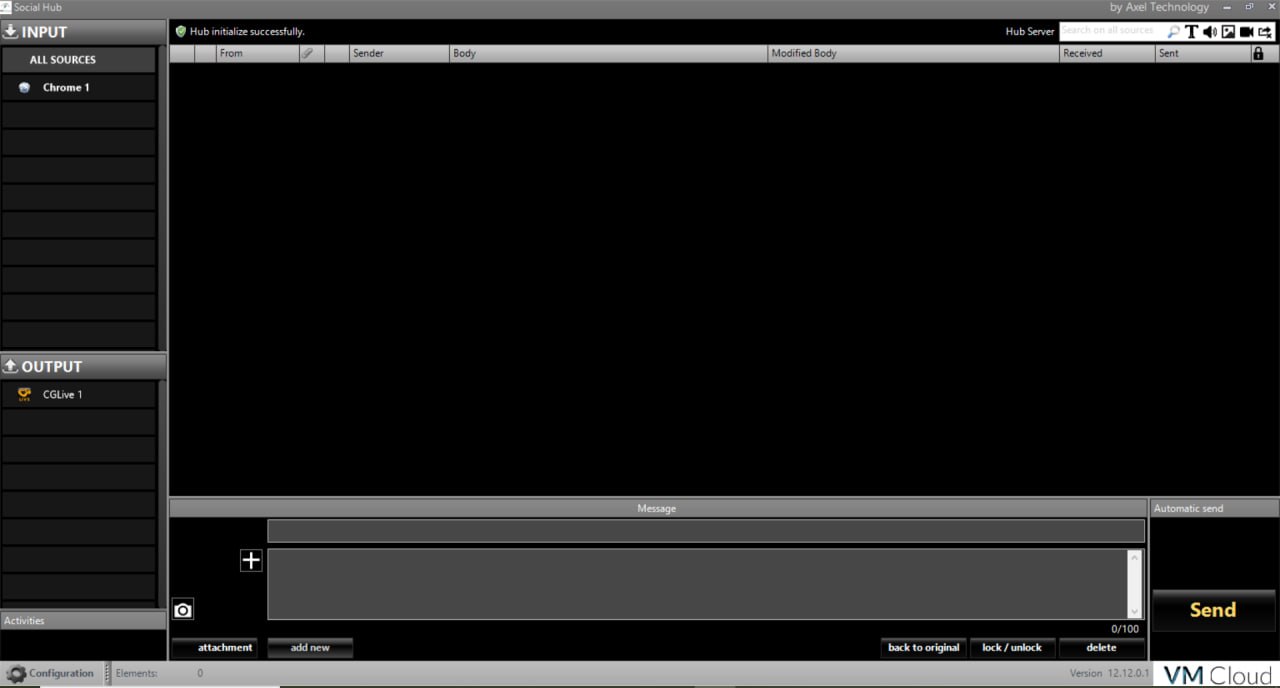
Key Features
1. Multi-Social Network IntegrationAxelTech SocialHub retrieves messages from Facebook, Twitter, Instagram, Flickr, WhatsApp, Line, Chrome web pages, RSS feeds, OpenWeatherMap, Skype, and SMS from mobile phones (via GSM module or Huawei device). Add-on modules allow connection to more social network types and profiles.
2. Automatic and Manual Broadcasting
The software supports both automatic retrieval and broadcasting of content for 24/7 operation, as well as manual selection and editing for presenter-driven shows. The automatic function is ideal for music television and sports channels where messages display on air according to automation playlist.
3. Hashtag Filtering and Content Organization
Organizes tweets and posts by filtering with #hash-tag keywords. Allows audience to instantly post on-screen messages and request songs. Messages can be catalogued and managed by content type.
4. CG Software Integration
Full integration with Axel Technology CG software including DLGPLUS and CGLIVE. Customize graphical appearance as ticker, crawl, static text, or combine with logos, lower thirds, animation, and live graphic templates.
5. Message Editing and Moderation
Modify area to edit text, remove blacklisted words, or delete junk posts. Users have full flexibility to select which message is most suitable for broadcasting before it goes on air.
6. Chrome Browser Extension
Special Chrome source allows selecting any text from any web page and sending it directly to SocialHub. Right-click options include Send with Social Hub, Show in Social Hub, and Save to Social Hub.
7. WhatsApp Message Extraction
Extract WhatsApp messages using two methods: Android Virtual Machine (rooted Android with WhatsApp) or Chrome plugin at web.whatsapp.com with message forwarding.
What’s New in SocialHub V12.12.0.1
- Version V12.12.0.1 includes updated social media API integration for platforms that have changed their authentication methods.
- Deprecated sources (Facebook, Twitter, Flickr, Skype) are marked but still functional with Chrome extension workaround.
- Enhanced WhatsApp extraction methods.
- Improved Chrome extension for newer browser versions.
- Added support for additional RSS feed formats.
- Stability improvements and bug fixes.
Installation Guide
Follow these steps to install AxelTech SocialHub V12.12.0.1.- Run Install Shield: Execute the installer. Choose Next.
- Accept License Agreement: Check “I accept the terms of the license agreement” and choose Next.
- Install: Click Install to start installation.
- Complete Installation: After InstallShield completes, click OK.
- Google Chrome Extension: If you do not have Google Chrome, SocialHub will install it. A Chrome web page will open automatically. Click the top-right button and enable the extension. You will see the extension symbol at the top-right.
- Launch SocialHub: Run Social Hub from the start menu or desktop shortcut.
- Configure Social Sources: Click Configuration button. Add social sources (Chrome, Facebook, Twitter, WhatsApp, SMS, RSS, OpenWeatherMap, etc.).
- Configure Output Targets: Add output targets (CGLive, DLGPlus, FileWriter, DumperFolder, etc.).
- Start Receiving Messages: Return to main panel. Select source. Messages will appear automatically.
How to Use SocialHub
Step 1: Configure Social SourcesClick Configuration. Click Add Source. Select social network type (Chrome, WhatsApp, RSS, OpenWeatherMap, SMS, etc.). Enter account credentials and parameters. Set refresh seconds. Configure hide options for sender, image, body as needed.
Step 2: Configure Output Targets
Click Add Target under Output Targets. Select target type (CGLive, DLGPlus, FileWriter, DumperFolder, etc.). Enter IP address and port for CG software. Set folder path for file outputs. Link social sources to this target.
Step 3: Use Chrome Extension for Web Content
Browse any web page in Google Chrome. Select text. Right-click and choose Send with Social Hub (direct send), Show in Social Hub (edit before send), or Save to Social Hub (save for later).
Step 4: Extract WhatsApp Messages
Option A (Web): Go to web.whatsapp.com. Hover over message, click symbol, select Forward Message. Choose Send with Social Hub, Show in Social Hub, or Save to Social Hub. Option B (Android VM): Install VirtualBox. Download Android VM with pre-configured WhatsApp. Run VM, configure WhatsApp with phone number. Set source name/IP in SocialHub. Messages auto-extract.
Step 5: Monitor and Edit Messages
Main panel shows incoming messages by source. Select message. Edit text in modification box if needed. Click Back to original to revert. Add attachments if available.
Step 6: Send to Targets
Select target outputs (yellow check indicates automatic link). Manually check additional targets if desired. Click Send.
Step 7: Enable Automatic Mode
Right-click on source name. Select Automatic. All messages will be automatically sent to all configured targets for that social media.
Best Use Cases
| Use Case | Application | Key Benefit |
|---|---|---|
| Music TV Channel | Automatic mode + Hashtag filter | 24/7 song requests, viewer comments |
| Radio Station | SMS + WhatsApp + Twitter | Audience interaction, song requests |
| TV Talk Show | Manual mode + Chrome extension | Curated audience questions |
| Sports Channel | Twitter hashtag + RSS feeds | Live tweets, news ticker |
| Weather Channel | OpenWeatherMap source | Automated weather updates |
| Church/Event Broadcast | SMS + Watchfolder | Prayer requests, event announcements |
Advantages and Limitations
Advantages:- AxelTech SocialHub retrieves messages from multiple social networks simultaneously.
- Automatic and manual broadcasting modes support both 24/7 automated channels and presenter-driven shows.
- Hashtag filtering organizes content by topic. Blacklist word filtering prevents inappropriate content.
- Full integration with Axel Technology CG software (DLGPLUS, CGLIVE) enables professional on-air graphics.
- Chrome extension allows sending any selected web text to broadcast.
- Multiple output targets support CG software, file outputs, and RDS encoders.
- SMS integration via GSM module provides offline audience engagement.
- Weather data and RSS feeds add automated content sources. Logging and reporting for audit trails.
- Facebook, Twitter, Flickr, and Skype sources are marked deprecated; Chrome extension method is recommended.
- WhatsApp extraction requires Android VM or web.whatsapp.com manual forwarding.
- GSM module hardware required for SMS reception.
- Requires Google Chrome browser for extension functionality.
Frequently Asked Questions
Q1. What is SocialHub used for?AxelTech SocialHub retrieves social network messages and texts from mobile phones, organizes them for DJs/TV presenters, and sends them to CG software for on-air display.
Q2. What social networks are supported?
Facebook, Twitter, Instagram, WhatsApp, Line, Chrome web pages, RSS feeds, OpenWeatherMap, and SMS. Add-on modules available for more networks.
Q3. How does the Chrome extension work?
Install the extension from SocialHub. Select any text on any web page, right-click, and choose Send with Social Hub, Show in Social Hub, or Save to Social Hub.
Q4. Can SocialHub run 24/7 automatically?
Yes. Right-click on the source name and select Automatic. All messages are automatically sent to configured targets without manual intervention.
Q5. How do I extract WhatsApp messages?
Two methods: Use web.whatsapp.com with Chrome extension (manual forwarding), or use Android Virtual Machine with pre-configured WhatsApp for automatic extraction.
HomePage
Note: This price Is For Single PC License. If You Want To Buy KeyGen Then You Have To Go On Telegram ID @playoutking
Our Paid Service
Looking for full-version software without limitations? You’re in the right place. Instead of wasting time on unreliable or outdated sources, unlock a powerful bundle of 10k+ premium tools covering marketing, SEO, broadcasting, automation, and business productivity — all in one place at an affordable price. This collection is specially curated for freelancers, agencies, and business owners who want fast, real results with professional tools.
Direct contact: :
Join Us For Update :
Join Us For Updated :
You Can test through AnyDesk before Buying,
And When You Are Satisfied, Then Buy It.
Unlimited PCs/Users.
Join today and upgrade your workflow with premium tools.
Looking for full-version software without limitations? You’re in the right place. Instead of wasting time on unreliable or outdated sources, unlock a powerful bundle of 10k+ premium tools covering marketing, SEO, broadcasting, automation, and business productivity — all in one place at an affordable price. This collection is specially curated for freelancers, agencies, and business owners who want fast, real results with professional tools.
Direct contact: :
Join Us For Update :
Join Us For Updated :
You Can test through AnyDesk before Buying,
And When You Are Satisfied, Then Buy It.
Unlimited PCs/Users.
Join today and upgrade your workflow with premium tools.


