
Summary
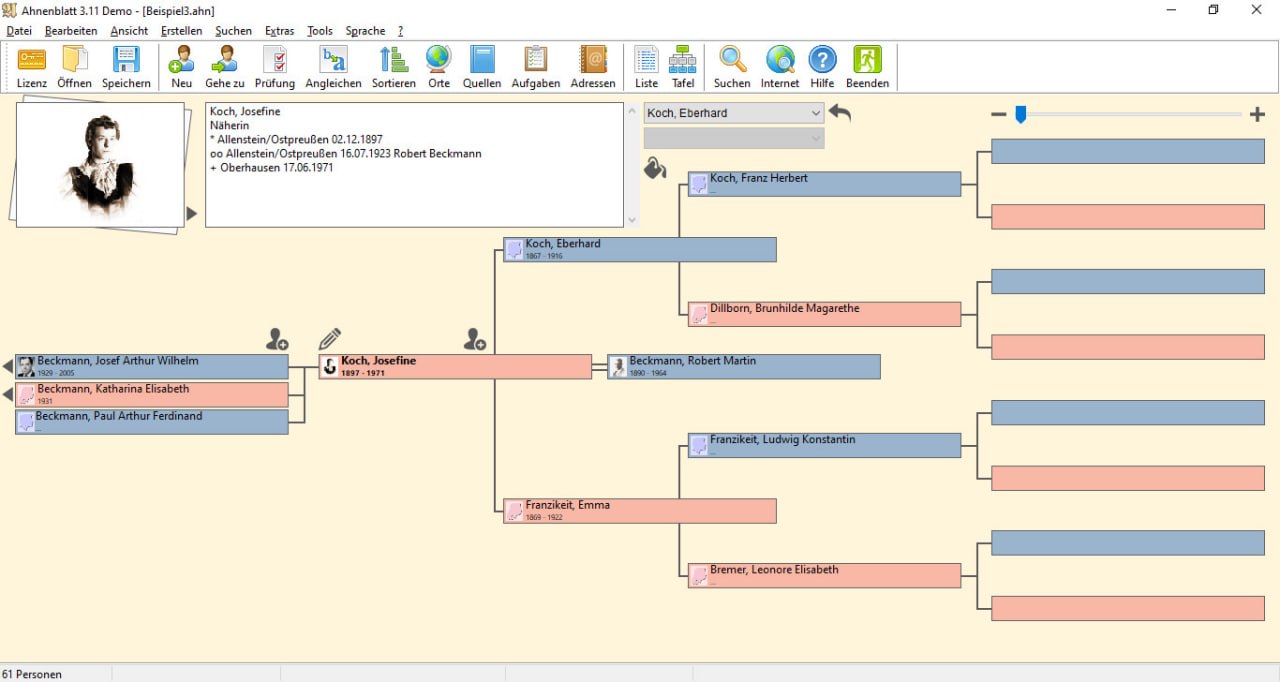
Ahnenblatt is a professional genealogy software designed for family historians, genealogists, and anyone researching their family tree. Unlike web-based ancestry platforms that store your data on third-party servers, Ahnenblatt is a desktop application that keeps your family data on your own computer. It provides tools for entering, organizing, , and sharing genealogical information. The software is used by amateur genealogists, professional researchers, family history societies, and individuals creating family legacy documents.What’s New in Ahnenblatt 4.47
- Version 4.47 includes improved PDF export with higher resolution for charts.
- Enhanced GEDCOM 7.0 compatibility.
- Updated language translations.
- Bug fixes for date calculations on historical calendar dates.
- Improved handling of large family trees (over 10,000 individuals).
- Performance optimizations for chart generation.
Installation Guide
Follow these steps to install Ahnenblatt 4.47.- Download the Installer: Visit the official Ahnenblatt website (ahnenblatt.com) and download the installer. The software is free, but donations are appreciated.
- Run the Installer: Double-click the downloaded file. Windows may ask for administrator permission.
- Select Language: Choose your preferred language (German, English, French, Spanish, etc.).
- Accept License: Read and accept the license agreement.
- Choose Installation Folder: Select where to install the software (default: C:\Program Files\Ahnenblatt).
- Select Components: Choose which components to install (program files, help files, language packs).
- Complete Installation: Click Install. The installer copies files and creates shortcuts.
- Launch Ahnenblatt: Open the software from the desktop shortcut or start menu.
- First-Time Setup: The software prompts you to enter your name (which will appear as the “researcher”). You can also open an existing GEDCOM file or start a new family tree.
Advantages and Limitations
Advantages:- It is free and donation-supported, making it accessible to anyone.
- The software is easy to learn a beginner can enter their first family members within 15 minutes.
- GEDCOM compatibility ensures data portability. You are never locked into the software.
- Your family data can move to any other genealogy application.
- The charting and reporting features are comprehensive.
- Print-quality ancestor trees, descendant trees, and narrative reports are suitable for family distribution or book publication.
- The software is lightweight and runs on modest hardware. A laptop from 10 years ago is sufficient.
- It is Windows-only. There is no native macOS or Linux version. (Mac users can run it via Wine or virtual machine.)
- The mapping feature requires an internet connection for OpenStreetMap. Offline maps are not available.
- The user interface, while functional, looks dated compared to modern web-based genealogy platforms.
- There is no built-in integration with Ancestry.com, FamilySearch, or MyHeritage. You must manually import/export GEDCOM files.
Frequently Asked Questions
Q1. Is Ahnenblatt really free?Yes. It is free software. Donations are appreciated to support development but are not required.
Q2. Can I import data from Ancestry.com or FamilySearch?
Yes. Export your Ancestry or FamilySearch tree as a GEDCOM file, then import that file into Ahnenblatt.
Q3. Can I export data to share with other genealogy software?
Yes. It exports GEDCOM 5.5 and 7.0 files, compatible with all major genealogy applications.
Q4. Does Ahnenblatt support DNA integration?
No. It does not have built-in DNA tools. Export your family tree as GEDCOM and import into DNA-focused software like RootsMagic or GenomeLink.
Q5. How many people can I enter in my family tree?
The software supports tens of thousands of individuals. Performance remains acceptable up to 20,000-30,000 people.
HomePage
Note: This price Is For Single PC License. If You Want To Buy KeyGen Then You Have To Go On Telegram ID @playoutking
Our Paid Service
Looking for full-version software without limitations? You’re in the right place. Instead of wasting time on unreliable or outdated sources, unlock a powerful bundle of 10k+ premium tools covering marketing, SEO, broadcasting, automation, and business productivity — all in one place at an affordable price. This collection is specially curated for freelancers, agencies, and business owners who want fast, real results with professional tools.
Direct contact: :
Join Us For Update :
Join Us For Updated :
You Can test through AnyDesk before Buying,
And When You Are Satisfied, Then Buy It.
Unlimited PCs/Users.
Join today and upgrade your workflow with premium tools.
Looking for full-version software without limitations? You’re in the right place. Instead of wasting time on unreliable or outdated sources, unlock a powerful bundle of 10k+ premium tools covering marketing, SEO, broadcasting, automation, and business productivity — all in one place at an affordable price. This collection is specially curated for freelancers, agencies, and business owners who want fast, real results with professional tools.
Direct contact: :
Join Us For Update :
Join Us For Updated :
You Can test through AnyDesk before Buying,
And When You Are Satisfied, Then Buy It.
Unlimited PCs/Users.
Join today and upgrade your workflow with premium tools.