

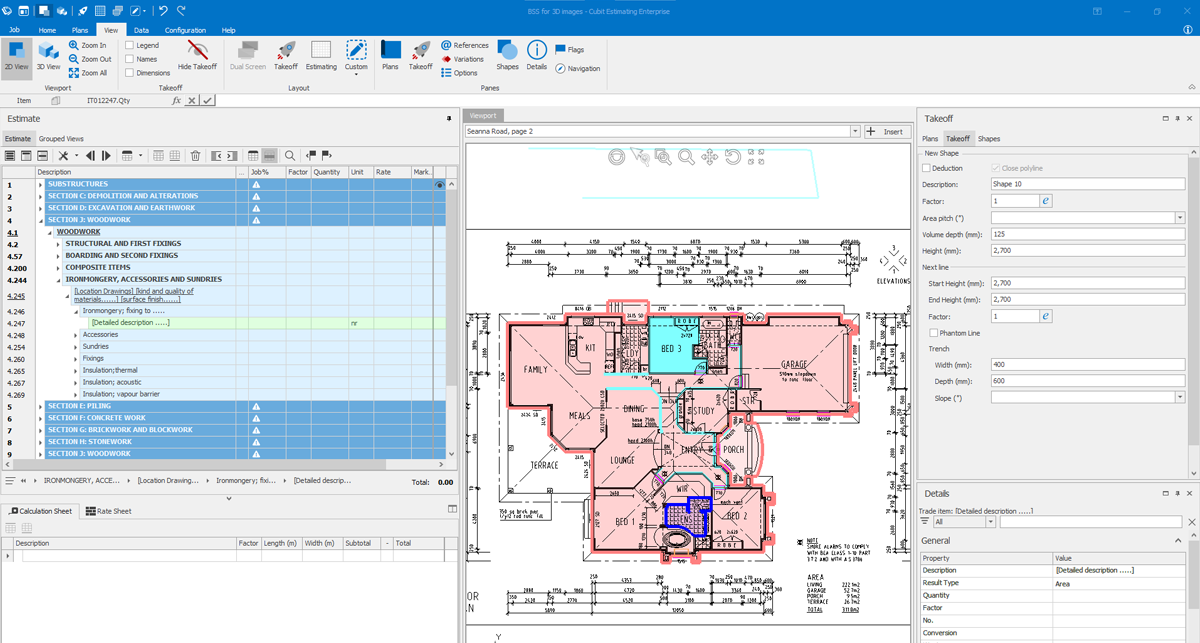
Summary
Cubit Estimating Enterprise v14.0.1.0 is a professional construction estimating software that integrates digital takeoff and cost estimation into a single, seamless platform. Unlike traditional estimating tools that separate quantity surveying from pricing, Cubit Estimating unifies these critical workflows, enabling contractors, builders, and subcontractors to manage complex projects with greater accuracy and efficiency.The software serves as a comprehensive solution for the modern construction professional. Whether you are a residential builder, commercial contractor, or specialty subcontractor, Cubit Estimating provides the structured workflow, cost analysis tools, and reporting capabilities needed to ensure profitability on every project. The latest version introduces enhanced performance, improved reporting, and integration with One Click LCA for sustainability optimization, making it a future-ready tool for the construction industry.
Key Features
Buildsoft Cubit Estimating Enterprise distinguishes itself through a robust feature set designed for professional estimators who demand precision and efficiency.1. Powerful Estimating with Structured Workflow
The software offers a structured and exclusive approach to estimating, helping professionals work efficiently on complex projects. Automated tools and synchronized workflows ensure seamless management of cost calculations and pricing. Key capabilities include:- Exclusive access features that prevent unintended modifications
- Enhanced security across all project files
- Detailed cost reports with guaranteed data accuracy
- Synchronized updates that keep all team members aligned
2. Digital Takeoff Integration
Cubit Estimating eliminates the need for manual quantity takeoff by integrating digital measurement directly into the estimating workflow. Users can:- Perform on-screen takeoff from digital plans
- Automatically transfer quantities to the estimate
- Reduce measurement errors and save significant time
- Handle plans of any size or complexity
4. One Click LCA Integration
A significant addition in version 14.0.1.0 is the ability to work with One Click LCA, a leading lifecycle assessment platform. This integration helps construction professionals:- Optimize sustainability efforts in construction projects
- Measure and reduce carbon footprint
- Comply with green building standards
- Demonstrate environmental responsibility to clients
5. Enhanced Templates and Interactive Planning
The software’s interactive interface simplifies project planning through customizable templates that enhance workflow efficiency. Users can:- Switch between structured views to improve visibility
- Identify cost-saving opportunities early in the planning phase
- Use refined reporting systems with automated calculation
- Reduce errors and ensure reliable estimates
7. Microsoft Integration
The software includes Microsoft integration, allowing users to work with familiar tools such as Excel for data manipulation and reporting. This integration:- Reduces the learning curve for new users
- Enables seamless data export to spreadsheets
- Supports custom reporting workflows
- Enhances collaboration across teams using Microsoft products
8. Rapid Bulk Delete Function
The new Rapid Bulk Delete function addresses a common pain point for estimators managing large datasets. This feature allows users to:- Remove a large number of items from the estimate sheet with a single action
- Choose between regular deletion or the new rapid function
- Set customizable threshold settings to trigger bulk delete options
- Tailor the tool to match specific workflow needs
10. Plan Rendering and Display
Plans are now rendered more efficiently and displayed with better clarity. This improvement makes it simpler to work with large jobs by:- Reducing load times for complex drawings
- Improving visual clarity of plan details
- Enabling smoother navigation through multi-page documents
- Supporting high-resolution displays for better visibility
What’s New in Buildsoft Cubit Estimating Enterprise v14.0.1.0
Version 14.0.1.0 introduces several significant enhancements that improve speed, usability, and functionality.- The ability to work with One Click LCA represents a major addition for sustainability-focused construction firms. This integration enables carbon footprint assessment and lifecycle analysis directly within the estimating workflow.
- The new Rapid Bulk Delete function, developed based on customer feedback, allows estimators to remove large quantities of items efficiently. The customizable threshold setting gives users control over when the bulk delete option triggers.
- The speed of locking and unlocking Trades in shared access mode has been significantly improved. This enhancement ensures smoother collaboration when multiple estimators work on the same project.
- Plans are now rendered more efficiently and displayed with better clarity. Users working with large jobs will notice improved performance and reduced waiting times.
- Users can now refresh project data faster, allowing them to manage many tasks simultaneously with optimized performance. This improvement is particularly valuable for estimators handling multiple projects or complex estimates.
Installation Guide
Follow these steps to install Buildsoft Cubit Estimating Enterprise v14.0.1.0 on your Windows system.- Obtain the Installer: Download the official Buildsoft Cubit Estimating installer from the authorized distributor or your Buildsoft account portal.
- Try Before You Buy: A version is available for evaluation purposes. You can test the estimating, takeoff, and reporting features before making a purchase commitment.
- Verify System Compatibility: Confirm that your workstation meets the minimum system requirements, particularly for RAM and storage.
- Run as Administrator: Right-click the installer file and select “Run as Administrator” to ensure proper registry configuration.
- Follow the Setup Wizard: The wizard will guide you through license acceptance, installation directory selection, and component choices.
- Configure Shared Access Settings: If multiple team members will use the software, set up shared access mode preferences during installation.
- Activate Your License: Launch Buildsoft Cubit Estimating and enter your license key. Trial users can begin immediately without activation.
- Set Up One Click LCA Integration: If using sustainability features, configure the One Click LCA connection in the settings menu.
How to Use Buildsoft Cubit Estimating Enterprise
Mastering Cubit Estimating involves understanding the integrated workflow from digital takeoff to final cost reporting.Step 1: Import Digital Plans
Upload your project plans in supported formats. The software will render plans efficiently for on-screen takeoff. Use the improved display clarity to identify all measurable elements.Step 2: Perform Digital Takeoff
Measure quantities directly from the plans using the integrated takeoff tools. Quantities automatically transfer to the estimate sheet, eliminating manual data entry and reducing errors.Step 3: Apply Pricing and Cost Data
Use built-in cost databases or import your own pricing. The cost analysis tools and total columns provide real-time visibility into project budgets. Track markup values to ensure profitability.Step 4: Organize with Trades and Templates
Organize estimates by Trade categories. Use enhanced templates to speed up repetitive estimating tasks. Switch between structured views to identify cost-saving opportunities.Step 5: Collaborate in Shared Access Mode
When working with team members, use shared access mode to collaborate on the same estimate. The improved locking and unlocking speeds ensure smooth workflows even with multiple users.Step 6: Perform Bulk Deletions as Needed
When removing large numbers of items, use the Rapid Bulk Delete function. Set your preferred threshold to trigger the bulk option. Choose between regular deletion or the rapid method based on your needs.Step 7: Generate Reports and Export
Create detailed cost reports using the refined reporting system. Export data to Microsoft Excel using the built-in Microsoft integration. Share reports with stakeholders for review and approval.Step 8: Assess Sustainability with One Click LCA
For projects requiring environmental assessment, use the One Click LCA integration to measure carbon footprint and optimize sustainability outcomes.Best Use Cases
Buildsoft Cubit Estimating Enterprise serves multiple construction sectors and project types.- Home builders use Cubit Estimating to generate accurate quotes for custom homes and development projects. The software handles everything from foundation takeoff to finish carpentry pricing, ensuring profitable bids.
- Commercial contractors rely on the software for large-scale projects including offices, retail spaces, and industrial facilities. The structured workflow and shared access mode support complex estimates with multiple contributors.
- Specialty subcontractors—including electrical, plumbing, HVAC, and concrete—use Cubit Estimating to prepare competitive bids. The digital takeoff tools ensure accurate quantity measurement for specialized scopes of work.
- Firms pursuing green building certification use the One Click LCA integration to measure and document environmental performance. This capability supports LEED certification and other sustainability standards.
- Contractors use the software to adjust estimates when project scope changes. The exclusive editing options prevent costly delays and miscalculations during the change order process.
Advantages and Limitations
Understanding the strengths and constraints of Buildsoft Cubit Estimating Enterprise helps organizations make informed decisions.Advantages:
- Integrated Takeoff and Estimating: Eliminates the need for separate takeoff software, reducing errors and saving time. Quantities flow automatically from measurement to pricing.
- Structured Workflow: The exclusive approach to estimating ensures consistency across projects and team members. Access controls prevent unintended modifications.
- Sustainability Integration: The One Click LCA connection sets Cubit Estimating apart for firms focused on green building and carbon reduction.
- Rapid Bulk Delete: The new bulk deletion function, developed from customer feedback, significantly speeds up estimate maintenance for large projects.
- Shared Access Collaboration: Multiple estimators can work on the same estimate simultaneously with improved locking and unlocking performance.
- Microsoft Integration: Familiar Excel workflows reduce the learning curve and support custom reporting.
- 3D Modeling: Visual representation of project elements enhances planning accuracy and stakeholder communication.
Alternatives to Buildsoft Cubit Estimating
Depending on your specific needs, budget, and preferred workflow, several alternatives exist in the construction estimating software space.| Software | Best For | Key Difference from Cubit Estimating |
|---|---|---|
| Bluebeam Revu | PDF takeoff and markup | Stronger document management but less comprehensive estimating |
| PlanSwift | Digital takeoff | Focused primarily on takeoff with separate estimating modules |
| Stack Estimating | Cloud-based estimating | Browser-based access but fewer advanced features |
| Sage Estimating | Large enterprise construction | Deeper accounting integration but steeper learning curve |
| ProEst | Bid management | Strong bid submission workflow but less takeoff capability |
| RSMeans Data Online | Cost data reference | Excellent pricing data but not a full estimating platform |
Frequently Asked Questions
What types of construction projects can I estimate with Cubit Estimating?Cubit Estimating supports residential, commercial, industrial, and specialty trade projects. Whether you are building single-family homes, office towers, or infrastructure, the software adapts to your needs.
Does Cubit Estimating include digital takeoff?
Yes. The software integrates digital takeoff directly into the estimating workflow. You can measure quantities from digital plans, and the values automatically transfer to your estimate sheet.
What is One Click LCA integration?
One Click LCA is a lifecycle assessment platform for measuring environmental impact. Cubit Estimating’s integration allows users to assess carbon footprint and optimize sustainability directly within the estimating workflow.
How does the Rapid Bulk Delete function work?
The Rapid Bulk Delete function allows you to remove a large number of items from your estimate sheet with a single action. You can set a customizable threshold that triggers the bulk option based on the amount of data being deleted.
Can multiple estimators work on the same project?
Yes. The shared access mode allows multiple team members to work on the same estimate simultaneously. Version 14.0.1.0 includes improved speed for locking and unlocking Trades in shared access mode.
Is there a free trial available?
Yes. A free trial version is available for evaluation purposes. You can test the estimating, takeoff, and reporting features before making a purchase commitment.
Home page
Note: This price Is For Single PC License. If You Want To Buy KeyGen Then You Have To Go On Telegram ID @playoutking
Our Paid Service
If you want to Purchase Cracked Version / KeyGen Activator /License Key
Contact Us on our :
Join Us For Update :
Join Us For Update :
Crack Software Policies & Rules:
Lifetime Activation, Unlimited PCs/Users,
You Can test through AnyDesk before Buying,
And When You Are Satisfied, Then Buy it.
If you want to Purchase Cracked Version / KeyGen Activator /License Key
Contact Us on our :
Join Us For Update :
Join Us For Update :
Crack Software Policies & Rules:
Lifetime Activation, Unlimited PCs/Users,
You Can test through AnyDesk before Buying,
And When You Are Satisfied, Then Buy it.


