

Summary
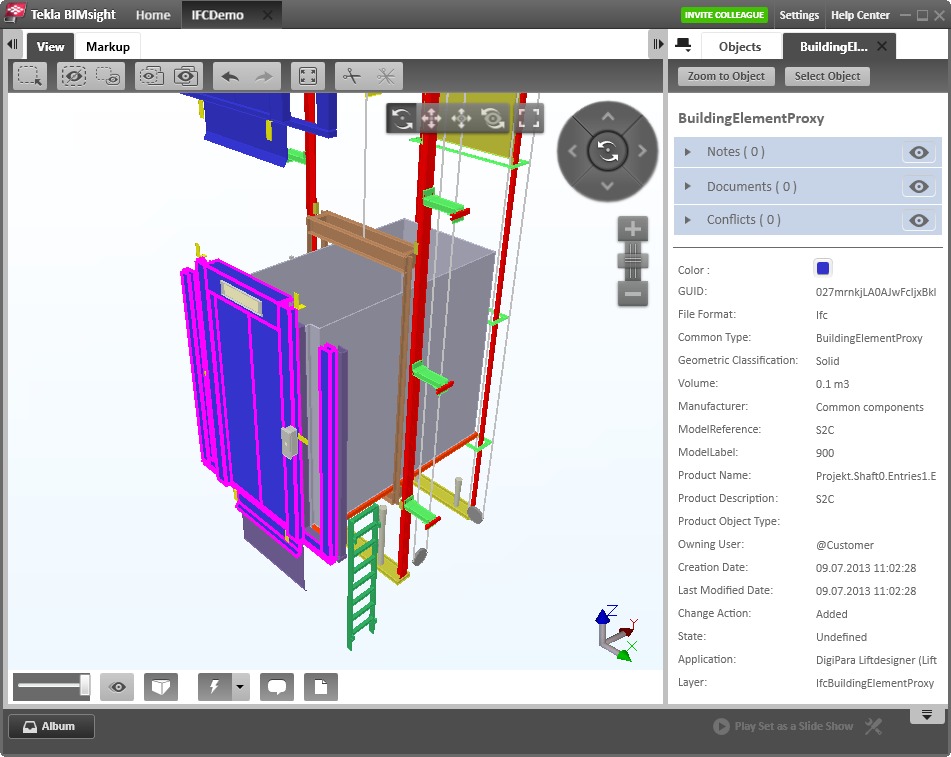
Elevator design has traditionally been a time-consuming process, requiring manual drafting and careful coordination with architects and building planners. DigiPara Liftdesigner 2015 emerged as a powerful solution to streamline this workflow, offering a standalone Windows application that automates the creation of elevator drawings and 3D BIM models. DigiPara Liftdesigner 2015 is a specialized Windows‑based software application for the design and documentation of elevators and escalators. Released in 2015 (version 15.00.97), it provides engineers, drafters, and vertical transportation consultants with a comprehensive toolset to create general arrangement drawings, calculate shaft dimensions, and generate 3D BIM models for integration into architectural projects.Key Features
DigiPara Liftdesigner 2015 bundles a wide range of time‑saving capabilities into a single package. Below are the core features that made this version a valuable tool for the elevator industry.- 01. ShaftWizard – Create a new elevator project within minutes. Enter payload, number of stops, choose traction or hydraulic elevator type, define roping, and the ShaftWizard automatically configures the complete 3D elevator model and loads required 2D drawings.
- 02. Intelligent Elevator Configurator – Benefits from predefined elevator parameters, component structures, and elevator logic. No need to develop your own configurations from scratch.
- 03. Any Shaft Dimensions – Design for both new installations and modernization projects. The software calculates shaft sizes, which you can easily modify by adjusting clearances or car dimensions.
- 04. Group Configurator – Create elevator groups with a single click. Duplicate individual groups or opposite‑facing group elevators, with each unit configured individually or identically.
- 05. 70+ Supplier Component Library – Access an extensive 3D BIM library containing components from over 70 global elevator component suppliers, allowing you to select compatible parts quickly.
Pricing & Plans
DigiPara Liftdesigner 2015 was sold under a commercial license model. Historically, DigiPara offered an alternative called Liftdesigner Cloud Free Edition, which allowed anyone to use the software for free, enabling suppliers to share 3D BIM models with potential clients. This free edition covered 100% of potential clients and was used in over 4,000 installations globally.For the official version of Liftdesigner 2015, interested users should contact DigiPara AG directly for pricing. Additionally, demo access is available for qualified organizations. While the 2015 version is no longer the latest release (newer versions exist up to 2025), current DigiPara licenses are typically valid for one year, with renewal options available for continued use.
Who Should Use This Software
- Beginners – Liftdesigner 2015 offers a gentle learning curve compared to generic CAD software. The ShaftWizard and intelligent configurator guide users through the design process, making it possible for junior drafters to produce professional drawings with minimal training.
- Professionals – Experienced elevator engineers and VT consultants benefit from the significant time savings. Tasks that once required manual drafting in AutoCAD can now be completed in minutes, with all changes automatically propagated across drawings and models.
- Agencies / Consulting Firms – Vertical transportation consultancies that manage multiple elevator projects simultaneously can standardize their workflows, reuse component libraries, and deliver consistent BIM models to architects and building owners.
When NOT to Use This Software
- Non‑Windows environments – DigiPara Liftdesigner 2015 is a Windows‑only application and does not run natively on macOS or Linux systems.
- Freelance designers with low volume – If you only design one or two elevators per year, the investment in a commercial license may not be justified. Simpler methods (manual drafting or basic CAD) might suffice.
- Projects requiring only 2D layouts – For purely conceptual layouts at LOD 100–200, the browser‑based DigiPara Elevatorarchitect (a separate tool) may be more appropriate, as it is faster and requires no installation.
- Unsupported older versions – As of 2026, version 2015 is outdated. Users requiring technical support or compatibility with the latest BIM standards (IFC 4.0, LOD 500) should consider upgrading to a more recent version such as Liftdesigner 2020 or newer.
System Requirements
| Requirement | Detail |
|---|---|
| Operating System | Microsoft Windows (7, 8, 8.1) – 64‑bit recommended |
| Processor | 2 GHz or faster multi‑core Intel or AMD |
| RAM | 4 GB minimum (8 GB recommended for large projects) |
| Disk Space | 500 MB for installation; additional space for projects |
| Graphics | DirectX 9‑compatible graphics card with 1 GB VRAM (dedicated GPU recommended for 3D modeling) |
| Display | 1280 x 1024 or higher resolution |
| Additional Software | Microsoft Excel (for Excel automation feature) |
| Internet Connection | Required for license activation and BIM library updates |
How to Use DigiPara Liftdesigner 2015
- Install the Software – Download the official version from DigiPara (or obtain installation media from your supplier). Run the installer on a Windows PC meeting the system requirements.
- Create a New Project – Launch Liftdesigner and select “New Project”. The ShaftWizard opens.
- Enter Basic Parameters – Specify elevator type (traction or hydraulic), payload capacity, number of stops, and machine room arrangement.
- Select Components – Choose components from the integrated BIM library (doors, guides, buffers, car finishes, etc.). Over 70 supplier libraries are available.
- Configure the Shaft – Enter shaft dimensions or let the software calculate them based on clearance requirements. Adjust clearances visually as needed.
- Generate Drawings – With one click, the software produces 2D general arrangement drawings (floor plans, sections, elevations) and a 3D BIM model.
- Export for Architects – Export the model in IFC or LD‑BIM format for use in Autodesk Revit or other BIM platforms.
- Produce Manufacturing Files – Export STEP/SAT files for production, or use Excel linking to update CAD models automatically.
Pros and Cons
Pros- Massive time savings – Automates what would otherwise require hours or days of manual drafting.
- Industry‑standard tool – Trusted by major manufacturers including Schindler, Otis, and thyssenkrupp.
- Comprehensive BIM support – Exports IFC and LD‑BIM with full LOD 100–500 and LOI property sets.
- Large component library – Over 70 suppliers‘ BIM models available directly within the software.
- Standalone operation – No external CAD program required (though integration is available).
- Excel + CAD integration – Links to Excel spreadsheets and CAD models for automatic updates.
Cons
- Windows only – No native support for macOS or Linux.
- Commercial license cost – Not a free tool (though demo access and occasional free editions have been available).
- Outdated version – As of 2026, version 2015 is obsolete. Newer releases offer improved BIM features (IFC 4.0, LOD MAX, improved property sets).
- Steep learning curve for non‑engineers – While easier than generic CAD, some understanding of elevator terminology and mechanics is required.
Expert Recommendation
If you are an elevator manufacturer, VT consultant, or installation company, DigiPara Liftdesigner (in its current version) is an essential tool. For the specific 2015 version, we recommend it only for:- Legacy project maintenance – If you have existing 2015 projects that need minimal updates.
- Learning purposes – To understand the fundamentals of elevator design before upgrading to a newer version.
- Budget‑constrained small firms – Only if you can obtain a legitimate license at a reduced cost.
AEO OPTIMIZATION (CRITICAL)
Quick Answers (Featured Snippets)
What is DigiPara Liftdesigner 2015?DigiPara Liftdesigner 2015 is a Windows‑based software for elevator design. It automates the creation of 2D drawings and 3D BIM models, using an intelligent configurator with predefined parameters and component libraries. It was developed by DigiPara AG, a German company founded in 1989.
Is it free or paid?
DigiPara Liftdesigner 2015 is commercial software sold under a paid license. However, DigiPara has historically offered a Liftdesigner Cloud Free Edition for component suppliers. For most professional users, a paid license or demo access is required.
Is it safe and legal?
Yes, when obtained from official sources. DigiPara is an established software company with over 35 years of experience in the elevator industry. Always download the official version from the developer‘s website to ensure safety and legality.
Who should use it?
Elevator manufacturers, vertical transportation consultants, elevator installation companies, and drafters who need to produce professional elevator drawings and BIM models. Major manufacturers like Schindler, Otis, and thyssenkrupp use DigiPara tools.
What are the main benefits?
The main benefits include significant time savings (hours reduced to minutes), automated shaft dimension calculation, access to over 70 supplier component libraries, full BIM export (IFC, LD‑BIM), and integration with Excel and CAD systems.
HomePage
Note: This price Is For Single PC License. If You Want To Buy KeyGen Then You Have To Go On Telegram ID @playoutking
Our Paid Service
Looking for full-version software without limitations? You’re in the right place. Instead of wasting time on unreliable or outdated sources, unlock a powerful bundle of 10k+ premium tools covering marketing, SEO, broadcasting, automation, and business productivity — all in one place at an affordable price. This collection is specially curated for freelancers, agencies, and business owners who want fast, real results with professional tools.
Direct contact: :
Join Us For Update :
Join Us For Updated :
You Can test through AnyDesk before Buying,
And When You Are Satisfied, Then Buy It.
Unlimited PCs/Users.
Join today and upgrade your workflow with premium tools.
Looking for full-version software without limitations? You’re in the right place. Instead of wasting time on unreliable or outdated sources, unlock a powerful bundle of 10k+ premium tools covering marketing, SEO, broadcasting, automation, and business productivity — all in one place at an affordable price. This collection is specially curated for freelancers, agencies, and business owners who want fast, real results with professional tools.
Direct contact: :
Join Us For Update :
Join Us For Updated :
You Can test through AnyDesk before Buying,
And When You Are Satisfied, Then Buy It.
Unlimited PCs/Users.
Join today and upgrade your workflow with premium tools.


