Summary
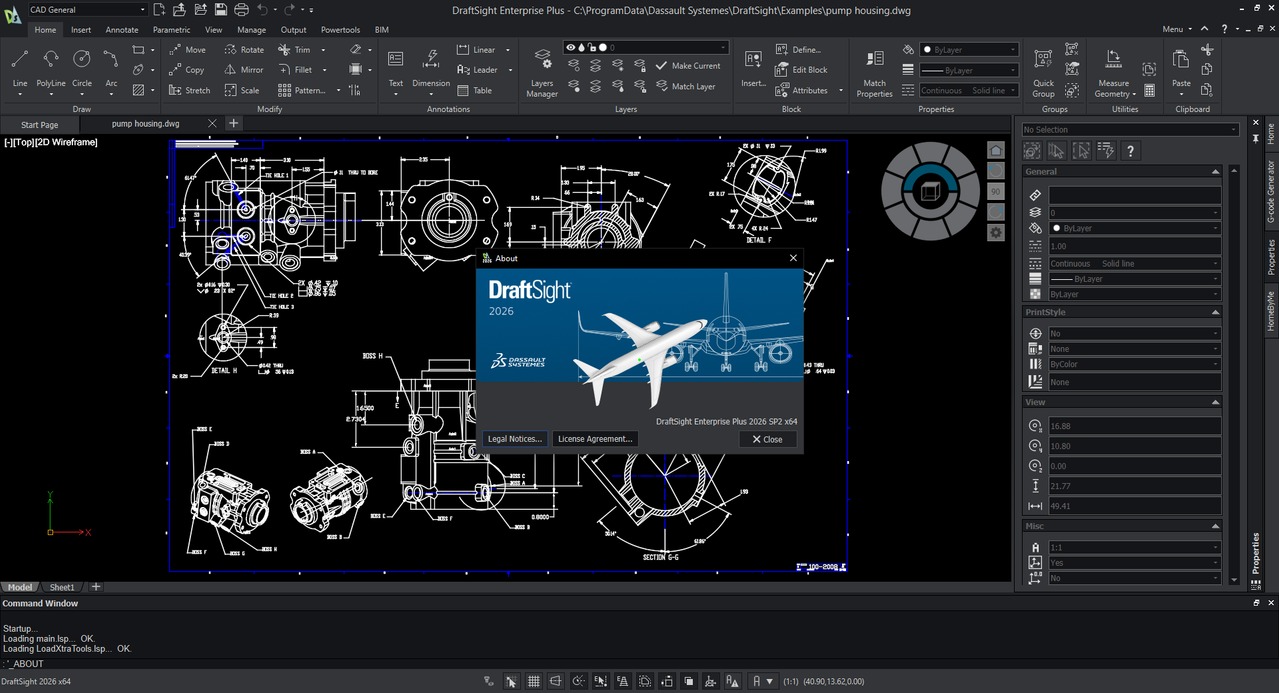
In the world of Computer-Aided Design (CAD), professionals need tools that are both powerful and efficient. Whether you’re creating detailed 2D technical drawings or complex 3D models, this platform provides a comprehensive toolkit to bring your ideas to life. This article explores its capabilities, ideal use cases, and how it fits into a modern, professional design environment. DraftSight is a feature-rich 2D and 3D CAD solution developed by Dassault Systèmes, the creators of SOLIDWORKS. It allows users to create, edit, view, and markup any kind of DWG file with greater ease, speed, and efficiency.Key Features
DraftSight Enterprise Plus 2026 SP2 is packed with tools that enhance productivity and design precision:- 01. Advanced 2D Drafting & 3D Modeling: Access a complete set of tools for creating everything from detailed floor plans to complex 3D assemblies. The platform allows you to effortlessly go from 2D drafting to 3D modeling and back again to optimize designs.
- 02. Full DWG File Compatibility: Work natively with industry-standard DWG and DXF files, ensuring seamless collaboration with clients, partners, and colleagues who use other CAD software.
- 03. Customizable Interface & Automation: Boost your workflow with a familiar, customizable interface. The software includes a powerful API for automation, allowing you to create macros and scripts to automate repetitive tasks.
- 04. Enhanced Data Extraction & Visualization: The 2026 SP2 release introduces upgrades to the Data Extraction tool, making it easier to pull information from your drawings. You also get expanded capabilities for gradients and patterns for richer visual presentations.
- 05. Network License & Deployment Wizard: Perfect for engineering managers and IT directors, this edition includes a network license and a deployment wizard to efficiently enable concurrent usage and manage compliance across an entire organization.
Who Should Use This Software
Beginners: New CAD users will find the familiar interface makes it easy to learn the fundamentals of drafting and design.Professionals: Engineers and architects who need a reliable, cost-effective alternative to other high-cost CAD software will find DraftSight to be a perfect fit, offering similar workflows without the expensive subscriptions. Agencies & IT Directors: Teams that require a managed, compliant CAD deployment across multiple users will benefit from the network licensing and centralized management tools.
When NOT to Use This Software
While powerful, DraftSight may not be the ideal solution in every scenario:- High-End 3D Rendering & Simulation: For advanced 3D rendering or complex physics simulations, a dedicated tool like SOLIDWORKS or Autodesk Inventor might be more suitable.
- Free, Open-Source Needs: If your budget is strictly zero and you only need basic 2D drafting, a fully free open-source option like LibreCAD or FreeCAD might be a better starting point.
System Requirements
Below are the recommended system requirements for running DraftSight 2026 efficiently.| Requirement | Minimum Specs |
|---|---|
| Operating System | Windows 10 / 11, 64-bit |
| Processor | Intel Core i3 (6th gen) or AMD equivalent |
| RAM | 4 GB (8 GB recommended) |
| Hard Disk Space | 5 GB of free space on an SSD |
| Display | 1920 x 1080 or higher |
Pros and Cons
Pros:- Cost-Effective: Provides a powerful feature set at a fraction of the cost of some competitors.
- Full DWG Compatibility: Works seamlessly with the most common file format in the industry.
- Familiar Interface: Easy for users switching from other CAD software, reducing training time.
- Scalable: Offers tiered plans for individuals, professionals, and large enterprises.
- Regular Updates: The 2026 SP2 release shows ongoing support with new features like a customizable status bar mode.
- No Permanently Free Version: Unlike the past, DraftSight no longer offers a fully free version for commercial use.
- 3D Capabilities: While robust, its 3D modeling tools are not as advanced as dedicated high-end 3D CAD software like SOLIDWORKS.
Best Alternatives
If you are exploring other options, here are some strong alternatives to consider:- AutoCAD LT: The industry standard for 2D drafting, but comes at a significantly higher subscription cost.
- FreeCAD: A powerful, open-source, parametric 3D modeler. It’s completely free but has a steeper learning curve and less polished interface.
- LibreCAD: An open-source 2D CAD application that is completely free. It is best suited for basic 2D drafting needs and is a good alternative for those on a zero budget.
- nanoCAD: A pro-grade 2D CAD system with native DWG support. It offers a free version with core capabilities, making it another strong contender for budget-conscious users.
FAQs
Is DraftSight Enterprise Plus free or paid?DraftSight Enterprise Plus is a paid, professional CAD solution. While a free trial is available for evaluation, continued use requires a valid subscription plan.
Is there a free trial available?
Absolutely. You can visit the official Dassault Systèmes website to download a fully functional free trial of DraftSight. This allows you to test its features and compatibility with your workflow.
Is it safe and legal to use?
Yes, using the official version from Dassault Systèmes is 100% safe and legal. We strongly advise against using “cracked” or unofficial “portable” versions from third-party websites, as these pose significant security risks and violate software licensing terms.
What are the best alternatives to DraftSight?
Some of the best alternatives include AutoCAD LT for an industry-standard, feature-rich option, and FreeCAD or LibreCAD for completely free, open-source alternatives.
Who should use the Enterprise Plus edition?
This edition is designed for engineering managers and IT directors who need to manage concurrent licenses for a team. It includes a network license and a deployment wizard, making it easy to ensure compliance and manage installations across an organization.
HomePage
Note: This price Is For Single PC License. If You Want To Buy KeyGen Then You Have To Go On Telegram ID @playoutking
Our Paid Service
Looking for full-version software without limitations? You’re in the right place. Instead of wasting time on unreliable or outdated sources, unlock a powerful bundle of 10k+ premium tools covering marketing, SEO, broadcasting, automation, and business productivity — all in one place at an affordable price. This collection is specially curated for freelancers, agencies, and business owners who want fast, real results with professional tools.
Direct contact: :
Join Us For Update :
Join Us For Updated :
You Can test through AnyDesk before Buying,
And When You Are Satisfied, Then Buy It.
Unlimited PCs/Users.
Join today and upgrade your workflow with premium tools.
Looking for full-version software without limitations? You’re in the right place. Instead of wasting time on unreliable or outdated sources, unlock a powerful bundle of 10k+ premium tools covering marketing, SEO, broadcasting, automation, and business productivity — all in one place at an affordable price. This collection is specially curated for freelancers, agencies, and business owners who want fast, real results with professional tools.
Direct contact: :
Join Us For Update :
Join Us For Updated :
You Can test through AnyDesk before Buying,
And When You Are Satisfied, Then Buy It.
Unlimited PCs/Users.
Join today and upgrade your workflow with premium tools.