Summary
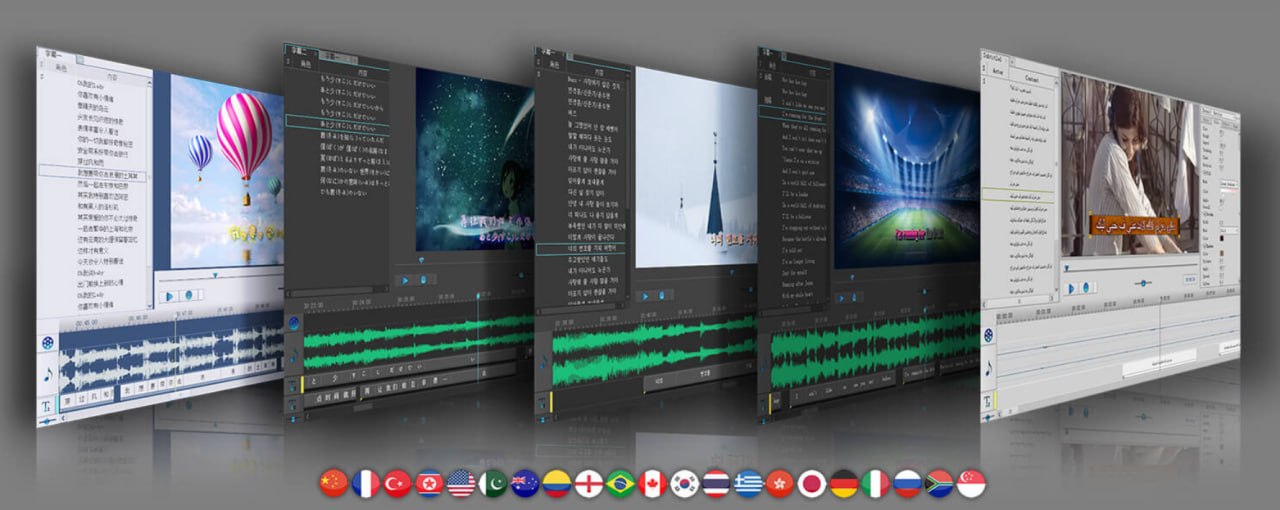
Sayatoo SubTitleMaker is a popular, Windows-exclusive software specifically designed for creating dynamic, professional-grade karaoke subtitles and lyric videos. It is widely used for producing complex, stylized text animations that perfectly synchronize with music and audio tracks. The latest version, v2.3.18.9486, was released on February 24, 2026. Unlike simpler subtitle tools that only allow basic text overlay, Sayatoo allows creators to add rich visual effects, transitions, and animations to each line of text, making it the go-to choice for music video creators, karaoke producers, and content creators who want their subtitles to stand out.Visual Effects And Customization Options
The visual customization capabilities of Sayatoo are extensive. You can apply various effects, including shadow, outline, gradient fill, particle effects, and 3D rotation. The software includes a wide range of transition effects between lines, including fade, slide, and scroll animations. A reading speed effect can change the color of text as you read through the subtitles, creating a dynamic karaoke experience. The software now includes particle effects and bounce effects with fade parameters. The “script” effect type allows custom fonts and custom code interaction syntax for advanced users. All visual effects are applied in real-time with a WYSIWYG (What You See Is What You Get) preview.Wide Compatibility And Integration
The output files can be imported into most major video editing software, including Corel VideoStudio, Adobe Premiere, Adobe After Effects, Canopus Edius, and Sony Vegas. The software supports both 32-bit and 64-bit Windows systems. It works on Windows 7 SP1, Windows 8, Windows 10, and Windows 11. The software also supports exporting subtitles in various formats, including the proprietary KAX format for protected project files. Templates now support saving multiple subtitle tracks, making it easier to reuse complex subtitle configurations across projects. The software also includes virtual camera functionality with a pause button for live streaming applications.Licensing And Availability
Sayatoo SubTitleMaker is available as paid software with a free trial version that allows you to explore its basic functions. To unlock all features and remove limitations like capped line saves, you must purchase a license. The official website provides downloads for both Windows and the newly added MacOS version with arm64 support. If you are looking for free, open-source alternatives for general subtitling, consider exploring Aegisub, but for professional karaoke and dynamic subtitles, Sayatoo remains the industry choice.FAQ
Q1: What is Sayatoo SubTitleMaker v2.3.18.9486?Sayatoo SubTitleMaker is a professional subtitle editing software designed for creating dynamic karaoke subtitles and lyric videos with rich visual effects and precise timing.
Q2: What operating systems does Sayatoo support?
It supports Windows 7 SP1, 8, 10, and 11 (both 32-bit and 64-bit), and now includes MacOS support with arm64.
Q3: What recording methods does the software offer?
It supports key tapping, mouse clicking, mouse dragging, line-by-line recording, and word-by-word recording.
Q4: What subtitle formats does Sayatoo support?
It supports SRT, ASS, LRC, KRC, and other common subtitle formats, with up to four tracks for bilingual subtitles.
Q5: Can I use Sayatoo with other video editing software?
Yes. Output files can be imported into Adobe Premiere, After Effects, Corel VideoStudio, Canopus Edius, Sony Vegas, and other major video editors.
Q6: What visual effects are available in Sayatoo?
Effects include shadows, outlines, gradients, 3D rotation, particle effects, bounce effects, transitions, and custom script effects.
Q7: Is there a free trial available?
Yes, a free trial version is available to explore basic functionality before purchasing a license.
Q8: Is the software suitable for professional karaoke production?
Yes, it is widely used for professional karaoke subtitle production with features like reading speed effects, particle animations, and precise word-level synchronization.
Q9: What is the reading speed effect?
It is an effect that changes the color of text progressively as you read through the subtitle, commonly used in karaoke tracks.
HomePage
Note: This price Is For Single PC License. If You Want To Buy KeyGen Then You Have To Go On Telegram ID @playoutking
Our Paid Service
Looking for full-version software without limitations? You’re in the right place. Instead of wasting time on unreliable or outdated sources, unlock a powerful bundle of 10k+ premium tools covering marketing, SEO, broadcasting, automation, and business productivity — all in one place at an affordable price. This collection is specially curated for freelancers, agencies, and business owners who want fast, real results with professional tools.
Direct contact: :
Join Us For Update :
Join Us For Updated :
You Can test through AnyDesk before Buying,
And When You Are Satisfied, Then Buy It.
Unlimited PCs/Users.
Join today and upgrade your workflow with premium tools.
Looking for full-version software without limitations? You’re in the right place. Instead of wasting time on unreliable or outdated sources, unlock a powerful bundle of 10k+ premium tools covering marketing, SEO, broadcasting, automation, and business productivity — all in one place at an affordable price. This collection is specially curated for freelancers, agencies, and business owners who want fast, real results with professional tools.
Direct contact: :
Join Us For Update :
Join Us For Updated :
You Can test through AnyDesk before Buying,
And When You Are Satisfied, Then Buy It.
Unlimited PCs/Users.
Join today and upgrade your workflow with premium tools.