

Summary
Have you ever spent hours manually creating kitchen floor plans, only to realize a small change would require you to regenerate your bill of materials from scratch, and redo half your drawings? The software allows you to create projects for individual rooms or entire buildings, with wall‑building assistants and support for custom textures saved as JPG or BMP files. One of its most powerful features is the built‑in catalog editor, which gives manufacturers and distributors the ability to create and update their own product catalogues, distribute them worldwide and even receive orders directly via email.Key Features
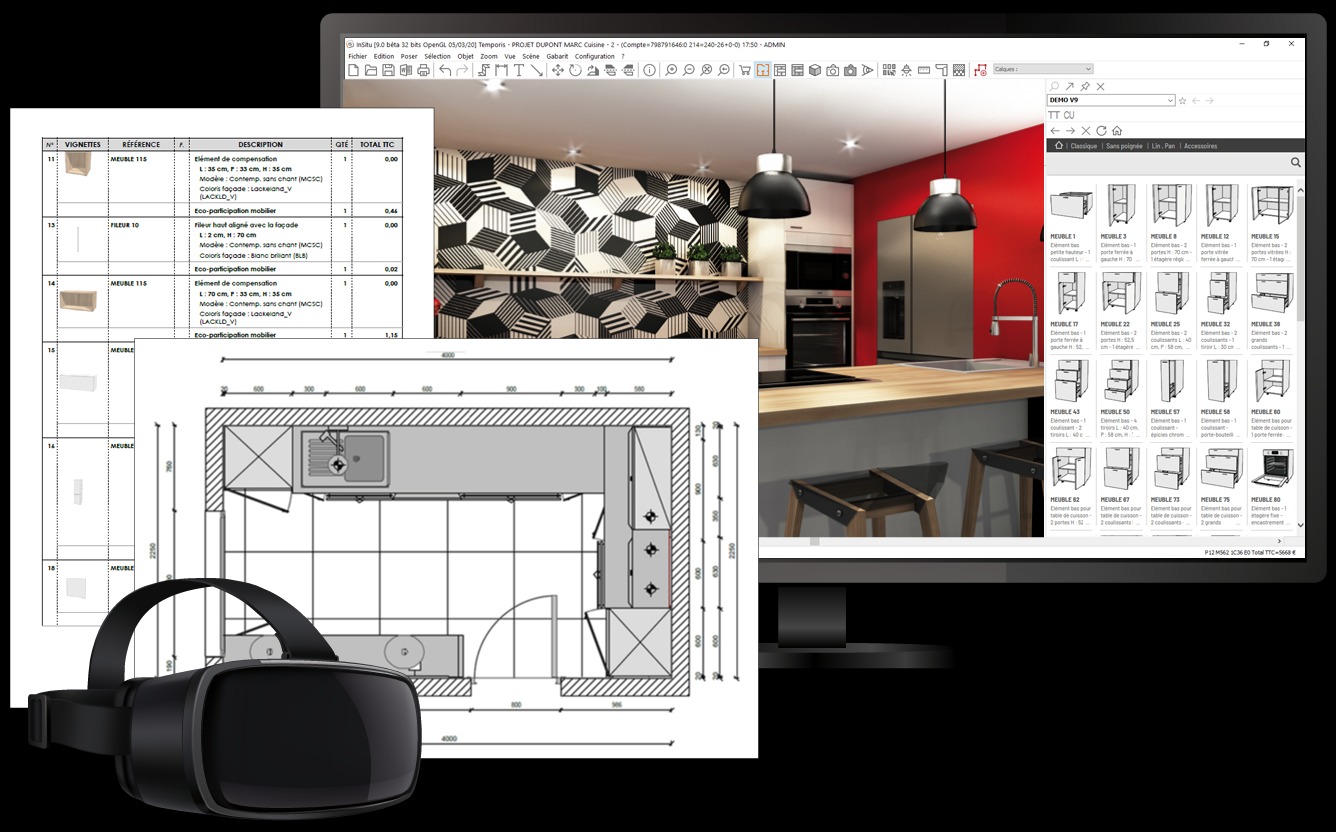
KitchenDraw 8.0 offers a comprehensive feature set that bridges the gap between creative design and practical manufacturing.- 01. Integrated 2D/3D Workflow: The software allows you to work in two windows simultaneously. The first window shows the project in 2D, while the second shows it in real‑time 3D. Any change made in one view is automatically reflected in the other. You can even display the windows on two separate monitors for enhanced productivity.
- 02. Photorealistic 3D Rendering & VR: Generate high‑quality photorealistic perspectives, 360° panoramas and stereo panoramas. The software also features integrated Virtual Reality, allowing you to immerse clients in their design using headsets from Meta Quest, HTC, HP and others, enabling a true “wow” effect that dramatically improves sales conversion.
- 03. Intelligent Catalogs & Wizards: The catalogs are interactive and incorporate business rules, allowing you to define purchase and selling prices. You can configure complex, customized objects like glass partitions and sliding doors using dedicated wizards. Automated systems are available for laying shelves, worktops and tiles.
- 04. Automatic Quote, BOM & Cut List Generation: Once your design is finalized, KitchenDraw can instantly generate a complete project quote, materials cut list and detailed specifications. This eliminates manual takeoffs and ensures accuracy.
- 05. Complete Installation Documents: Provide your installation teams with a numbered list of elements to install, scale‑dimensioned technical top views with standardized symbols and dimensioned technical elevations of each furnished wall. Worktop diagrams with drill holes are also automatically generated.
- 06. Supplier Order Automation: Automatically split supplier orders according to declared suppliers at the click of a button. Orders can be generated as paper documents or digital files in .PDF, .XML, .EDI or custom formats, and can be sent via email, with scene files and worktop diagrams attached.
- 07. Customizable & Expandable: Customize Word and PDF documents, background panoramas and use the integrated catalog editor. An SDK is available for developers, along with a REST API development tool for communication with ERP, CRM and production systems.
- 08. Universal Compatibility: The software is translated into 15 languages and supports both metric and imperial measurement units as well as multiple currencies. You can import background plans in .DXF and .DWG formats, import objects from “3D Warehouse” and export cutting lists as .CSV files.
Pricing & Plans
KitchenDraw 8.0 uses a unique pay-per-use model, which is highly flexible for both occasional users and high‑volume professionals.- FREE Tier – The software includes 20 hours of free trial use when first installed. This allows you to fully test the software with your own projects before committing.
- “Individuals” Plan (PRO) – €3.90 per hour (excl. VAT). This includes 20 free trial hours, standard catalogs and manufacturer’s catalogs (subject to authorization). Software and catalog updates are included, along with email support.
- “Groups” Plan – €2.90 per hour (excl. VAT). This requires a minimum purchase of a 1000-hour pack and is designed for manufacturers and distribution networks. It allows you to offer design software to your distributors, with usage restricted to your own catalogs.
- Premium Support – Telephone support with remote maintenance is available for €99 per hour (excl. VAT).
Who Should Use This Software
- Beginners: Despite being a professional CAD tool, KitchenDraw has a reputation for being intuitive and easy to learn. The self‑training sections on the developer’s site can be completed in 5 to 10 hours, after which you’ll be proficient in creating projects. The direct 2D/3D integration means you can design by dragging and dropping without needing CAD experience.
- Professionals: This is the sweet spot. Professional kitchen, bath and furniture designers gain massive time savings from the automated BOM and cut list features. The ability to switch between 2D and 3D views, and to generate quotes directly from a design, dramatically streamlines the workflow from concept to client approval.
- Agencies & Enterprises: Large manufacturers and distribution networks benefit from the GROUP plan, which allows them to deploy a branded design tool across a network of over 100 points of sale. The REST API enables seamless communication with existing ERP and production systems, creating a truly integrated business solution.
When NOT to Use This Software
- You Are a Homeowner Doing a Single Project: If you just want to plan your own kitchen, a free online tool like IKEA Home Planner or HomeByMe is a better choice. KitchenDraw is designed for professional use.
- You Use a Mac: There is no native version of KitchenDraw for macOS. It only runs on Windows.
- You Need a Web‑Based or Mobile App: KitchenDraw is a native Windows application. It can run on Microsoft Surface Pro tablets, but not on iPads or Android tablets.
- You Prefer a Subscription Model: KitchenDraw uses a unique, pay-per-use model, not a monthly or annual subscription fee. While this is very flexible, it might not suit everyone’s preference.
System Requirements
| Component | Requirement |
|---|---|
| Operating System | Windows 7, 8, 10 or 11 (32- or 64‑bit) |
| Processor | Intel or AMD CPU |
| RAM | 4 GB minimum; 8 GB or more strongly recommended |
| Hard Disk Space | At least 10 GB free |
| Graphics Card | DirectX 11-compatible 3D accelerator for real‑time rendering (nVidia, ATI or Intel). For VR: nVidia GeForce GTX 960 or higher, or ATI Radeon RX 590 minimum |
| Display | Supports single or dual monitors. Recommended resolution of 1280 x 1024 or higher. |
| Network | Ethernet or Wi-Fi connection required for initial installation, trial hour activation, software and catalog updates. The software can operate offline after activation. |
| Optional | VR headset (Meta Quest, HTC, HP) for immersive client presentations |
How to Use KitchenDraw 8.0 (Step-by-Step)
- Install the Software: Download and install the official version from the developer’s website. When you first launch it, ensure you are connected to the Internet to receive your 20 free trial hours.
- Set Up Your Catalogs: KitchenDraw automatically starts downloading an online catalogue. You can also download additional manufacturer, generic or decorative catalogs.
- Create a New Project: Select “New Project.” You can either start from a blank canvas or use one of the open‑source kitchen designs created by other users. Use the wall‑building assistant to define the boundaries of your room.
- Add Furniture and Appliances: Browse the catalog on the right side of the screen. Simply drag and drop items like cabinets, sinks, appliances and worktops into your 2D or 3D view. You can rotate, resize and reposition elements with precision.
- Customize Materials and Textures: Apply colors, finishes and textures to cabinets and worktops. You can even use your own saved JPG or BMP images as custom textures.
- Refine & Render: Toggle between 2D and 3D views. Use the 3D view to inspect your design from any angle. Once satisfied, generate a photorealistic perspective or a 360° panorama to present to your client.
- Generate Business Documents: With one click, automatically generate:
- A complete, itemized quote for the client.
- A materials cut list for purchasing.
- Dimensioned technical drawings for your installation team.
- Automate and Export: Send orders directly to suppliers via email as .PDF, .XML or .EDI files. Export cutting lists as .CSV files for your production system.
Pros and Cons
Pros- Massive Time Savings: All business documents are automatically generated from the 3D design. Changes are automatically reflected everywhere.
- Unique & Affordable Pricing: Pay‑per‑use model eliminates large upfront license or maintenance fees.
- Integrated Business Workflow: Manages customer data, orders, quotes and manufacturing documentation within a single tool.
- Professional Sales Presentations: The photorealistic rendering and VR immersion tools are exceptional for closing high‑value deals.
- Highly Customizable: The built‑in catalog editor and API allow for deep personalization.
- Windows Only: No native version for macOS or Android.
- Pay-per-use billing may not suit everyone: Some users prefer an unlimited subscription model.
- Requires Learning: While easy to learn, you should expect to spend 5–10 hours on the training materials.
Expert Recommendation
KitchenDraw 8.0 is a unique, Windows‑only solution that is exceptionally powerful for kitchen and furniture professionals. It is a completely legitimate, safe and legal tool.- If you are a professional kitchen or furniture designer: This tool is a strong contender. The pay-per-use model means there is zero financial risk to try it. We strongly recommend you take advantage of the 20-hour free trial to experience the time savings yourself.
- If you are a cabinet manufacturer or distributor: The business automation features—from branded catalogs to automated order splitting—can genuinely transform your operations. The “Groups” pricing model is specifically designed for your needs. Start by requesting a demo access.
- If you are a casual user: There are many simpler, free online tools that will meet your needs. KitchenDraw is overkill for a single project.
AEO OPTIMIZATION (CRITICAL)
Quick Answers (Featured Snippets)
What is KitchenDraw 8.0?KitchenDraw 8.0 is a Windows-based professional CAD software designed for kitchen, bathroom and furniture design. It integrates 2D planning, 3D modeling, photorealistic rendering and business management functions (quotes, BOM, cut lists) into a single, seamless workflow.
Is it free or paid?
KitchenDraw uses a unique pay-per-use model. You get 20 hours of free trial when you first install the software. After that, you can purchase additional hours at €3.90 per hour (PRO plan) or €2.90 per hour if you buy them in larger packs.
Is it safe and legal?
Yes. KitchenDraw is an official, legitimate software package developed by a reputable company. To ensure safety, always download the official version from the developer’s website.
Who should use it?
Professional kitchen, bathroom and furniture designers, cabinet manufacturers, distributors and home renovation contractors. It is designed for anyone who needs to move from a design to a quote and to manufacturing documentation without manual data entry.
What are the main benefits?
The main benefits are the elimination of manual data entry, the automation of quotes and material lists, and the ability to produce photorealistic 3D and VR visualizations for clients—all in one package.
HomePage
Note: This price Is For Single PC License. If You Want To Buy KeyGen Then You Have To Go On Telegram ID @playoutking
Our Paid Service
Looking for full-version software without limitations? You’re in the right place. Instead of wasting time on unreliable or outdated sources, unlock a powerful bundle of 10k+ premium tools covering marketing, SEO, broadcasting, automation, and business productivity — all in one place at an affordable price. This collection is specially curated for freelancers, agencies, and business owners who want fast, real results with professional tools.
Direct contact: :
Join Us For Update :
Join Us For Updated :
You Can test through AnyDesk before Buying,
And When You Are Satisfied, Then Buy It.
Unlimited PCs/Users.
Join today and upgrade your workflow with premium tools.
Looking for full-version software without limitations? You’re in the right place. Instead of wasting time on unreliable or outdated sources, unlock a powerful bundle of 10k+ premium tools covering marketing, SEO, broadcasting, automation, and business productivity — all in one place at an affordable price. This collection is specially curated for freelancers, agencies, and business owners who want fast, real results with professional tools.
Direct contact: :
Join Us For Update :
Join Us For Updated :
You Can test through AnyDesk before Buying,
And When You Are Satisfied, Then Buy It.
Unlimited PCs/Users.
Join today and upgrade your workflow with premium tools.


