
Summary
SPARKTA 2 is a professional engineering simulation software developed by Sparta Lightning Protection for the optimal design of shielding against direct lightning strikes. Unlike manual calculation methods that are time-consuming and prone to error, SPARKTA uses 3D modeling and probabilistic simulation models to determine the optimal placement of shield wires, air terminals, and lightning masts. The software is available in two editions: SPARKTA – Substations (for electrical substation protection) and SPARKTA – Buildings (for structure and facility protection).Key Features
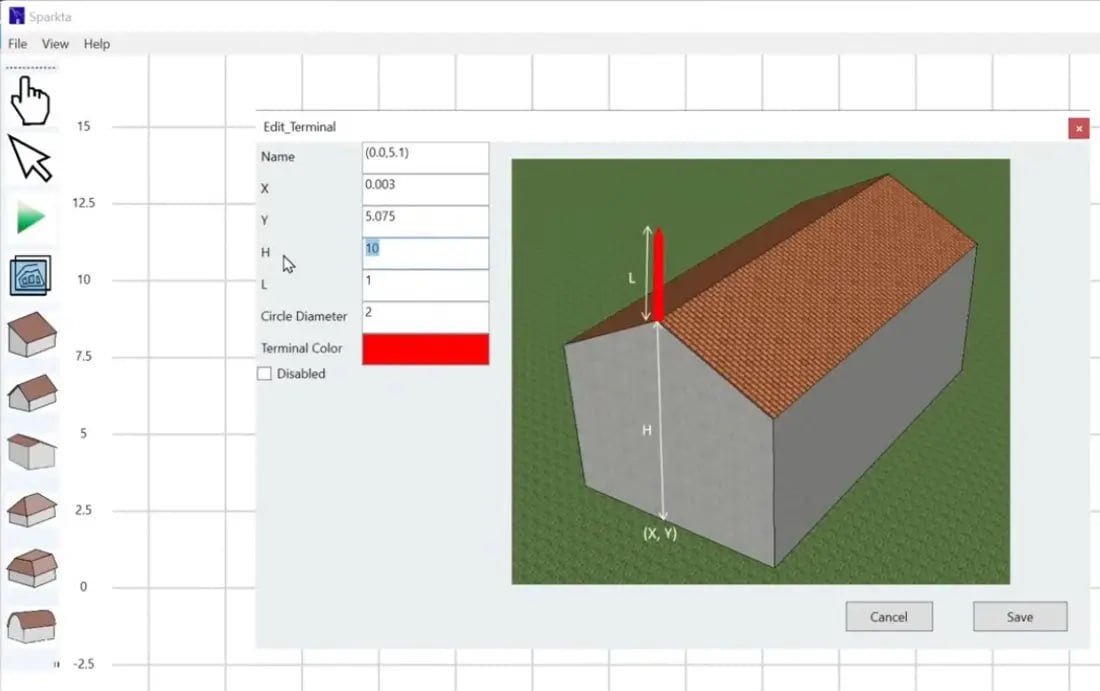
1. 3D Modeling for Optimal DesignCreate detailed 3D models of electrical substations, buildings, and industrial facilities. Simulate phase conductors, shield wires, air terminals, and lightning masts. Visualize the entire installation in 3D space.
2. Deterministic and Statistical Simulation
Choose between deterministic simulation (single current value) or statistical simulation (currents according to probabilistic distribution). This flexibility allows engineers to perform both conservative designs and probabilistic risk assessments.
3. Multiple Strike Termination Devices
Simulate various types of strike termination devices including air terminals (lightning rods), shield wires, metal roofs, and metal parts of structures with thickness greater than 3/16 inch.
4. Complex Installation Support
Simulate installations with multiple buildings. Model the protection given by neighboring structures. Evaluate the entire installation as a whole rather than individual buildings in isolation.
5. IEEE 998 Compliance
Calculate critical current and striking distance according to IEEE 998 standards. Ensure designs meet industry requirements for substation lightning protection.
What’s New in SPARKTA 2 (2026 Update)
- The 2026 update includes enhanced 3D modeling capabilities with improved visualization.
- Updated IEEE 998 compliance for critical current calculations.
- Expanded probabilistic distribution models for statistical simulation.
- Improved integration with SpaRISK for IEC 62305 risk assessment.
- Enhanced reporting with additional output formats.
- Performance optimizations for larger, more complex installations.
System Requirements
To run SPARKTA 2 effectively, your system should meet the following specifications.Minimum Requirements:
- Operating System: Windows 10 or Windows 11 (64-bit)
- Processor: Intel Core i5 or AMD equivalent (2.5 GHz)
- RAM: 8 GB minimum (16 GB recommended)
- Graphics: Dedicated GPU with 2 GB VRAM for 3D modeling
- Storage: 2 GB free space (SSD recommended)
- Display: 1920 x 1080 resolution
- Display: Dual monitors (1920 x 1080 or higher)
Installation Guide
Follow these steps to install SPARKTA 2.- Download the Installer: Obtain the official SPARKTA installer from the Sparta Lightning Protection website.
- Close Other Applications: Close any other engineering or simulation software.
- Run as Administrator: Right-click the installer and select “Run as Administrator.”
- Select Edition: Choose SPARKTA – Substations or SPARKTA – Buildings based on your application.
- Follow the Setup Wizard: Complete license acceptance, installation directory selection, and component configuration.
- Activate License: Enter license key or contact Sparta Lightning Protection for licensing options.
- Launch SPARKTA: Open the software and verify installation.
How to Use SPARKTA 2
Step 1: Create a New ProjectLaunch SPARKTA. Select New Project. Choose Substation or Building edition.
Step 2: Build 3D Model
Add structures, buildings, phase conductors, shield wires, air terminals, and lightning masts using 3D modeling tools.
Step 3: Configure Simulation Parameters
Select deterministic (single current) or statistical (probabilistic distribution) simulation. Define current values and distribution parameters. Set IEEE 998 parameters for critical current and striking distance.
Step 4: Run Simulation
Execute the lightning protection simulation. The software calculates shielding effectiveness and identifies unprotected areas.
Step 5: Evaluate Results
Review 3D visualization of protected areas. Identify any gaps in coverage. Adjust shield wire or air terminal placement as needed.
Step 6: Perform Risk Assessment (SpaRISK)
Use the integrated SpaRISK module to calculate risk according to IEC 62305. Define zones, entrance lines, and risk components.
Step 7: Generate Reports
Export simulation results and risk assessments to Word, Excel, or PDF. Include 3D views and calculation details.
Best Use Cases
| Use Case | Edition | Key Benefit |
|---|---|---|
| Electrical Substations | Substations | Phase conductor simulation, shield wire optimization |
| Industrial Facilities | Buildings | Complex installations, multiple buildings |
| Power Plants | Substations | IEEE 998 compliance, critical current calculation |
| Commercial Buildings | Buildings | Air terminal placement, neighboring structure protection |
| Risk Assessment | Both (with SpaRISK) | IEC 62305 compliance, zone-based risk components |
| Retrofit Design | Both | Evaluate existing protection, identify gaps |
Advantages and Limitations
Advantages:- SPARKTA provides 3D modeling for accurate lightning protection design.
- Both deterministic and statistical simulation options are available.
- The software supports multiple strike termination devices including air terminals, shield wires, and metal roofs.
- Complex installations with multiple buildings can be simulated as a whole. Neighboring structures are considered in protection calculations.
- IEEE 998 compliance ensures substation designs meet industry standards.
- Integrated SpaRISK module performs IEC 62305 risk assessment.
- Risk components can be calculated per zone. Reports can be exported to Word, Excel, or PDF.
- SPARKTA is specialized for lightning protection only, not general engineering simulation.
- The software requires a paid license for full functionality.
- 3D modeling may require dedicated GPU for complex installations.
- Learning curve for probabilistic simulation may be steep for new users.
Frequently Asked Questions
Q1. What is SPARKTA used for?SPARKTA is used for the optimal design of shielding against direct lightning strikes, specifically for electrical substations and buildings.
Q2. What is the difference between SPARKTA – Substations and SPARKTA – Buildings?
Substations edition simulates phase conductors and shield wires for electrical substations. Buildings edition simulates air terminals, metal roofs, and protection from neighboring structures.
Q3. What standards does SPARKTA follow?
SPARKTA follows IEEE 998 for critical current and striking distance calculations, and IEC 62305 for risk assessment (via SpaRISK).
Q4. What is deterministic versus statistical simulation?
Deterministic simulation uses a single current value. Statistical simulation uses currents according to a probabilistic distribution for more realistic risk assessment.
Q5. What is SpaRISK?
SpaRISK is an integrated module for Lightning Risk Assessment according to IEC 62305. It calculates risk for structures with multiple zones and entrance lines.
Q6. Can SPARKTA simulate multiple buildings?
Yes. SPARKTA – Buildings can simulate complex installations with multiple buildings and the protection given by neighboring structures.
Q7. What strike termination devices can be simulated?
Air terminals (lightning rods), shield wires, metal roofs, and metal parts of structures having thickness greater than 3/16 inch.
Q8. What reports can be generated?
Word, Excel, or PDF reports including simulation results, risk assessments, and 3D views.
Q9. What are the system requirements for SPARKTA 2?
Windows 10/11 64-bit, Intel Core i5 or better, 8GB RAM minimum (16GB+ recommended), dedicated GPU for 3D modeling.
Q10. Is there a free trial available?
Contact Sparta Lightning Protection through their website for trial and pricing information.
HomePage
Note: This price Is For Single PC License. If You Want To Buy KeyGen Then You Have To Go On Telegram ID @playoutking
Our Paid Service
Looking for full-version software without limitations? You’re in the right place. Instead of wasting time on unreliable or outdated sources, unlock a powerful bundle of 10k+ premium tools covering marketing, SEO, broadcasting, automation, and business productivity — all in one place at an affordable price. This collection is specially curated for freelancers, agencies, and business owners who want fast, real results with professional tools.
Direct contact: :
Join Us For Update :
Join Us For Updated :
You Can test through AnyDesk before Buying,
And When You Are Satisfied, Then Buy It.
Unlimited PCs/Users.
Join today and upgrade your workflow with premium tools.
Looking for full-version software without limitations? You’re in the right place. Instead of wasting time on unreliable or outdated sources, unlock a powerful bundle of 10k+ premium tools covering marketing, SEO, broadcasting, automation, and business productivity — all in one place at an affordable price. This collection is specially curated for freelancers, agencies, and business owners who want fast, real results with professional tools.
Direct contact: :
Join Us For Update :
Join Us For Updated :
You Can test through AnyDesk before Buying,
And When You Are Satisfied, Then Buy It.
Unlimited PCs/Users.
Join today and upgrade your workflow with premium tools.