
Summary
Aviation enthusiasts, plane spotters, and professionals monitoring air traffic need more than basic flight trackers. PlanePlotter is the industry‑leading desktop solution for receiving, decoding, and visualising live aircraft position reports. Whether you want to see civilian airliners overhead, track military aircraft without ADS‑B, or analyse historical flight data, PlanePlotter gives you the tools. With a generous 21‑day free trial of the official version, you can evaluate all core features – except internet sharing – before committing to a one‑time licence fee.Key Features
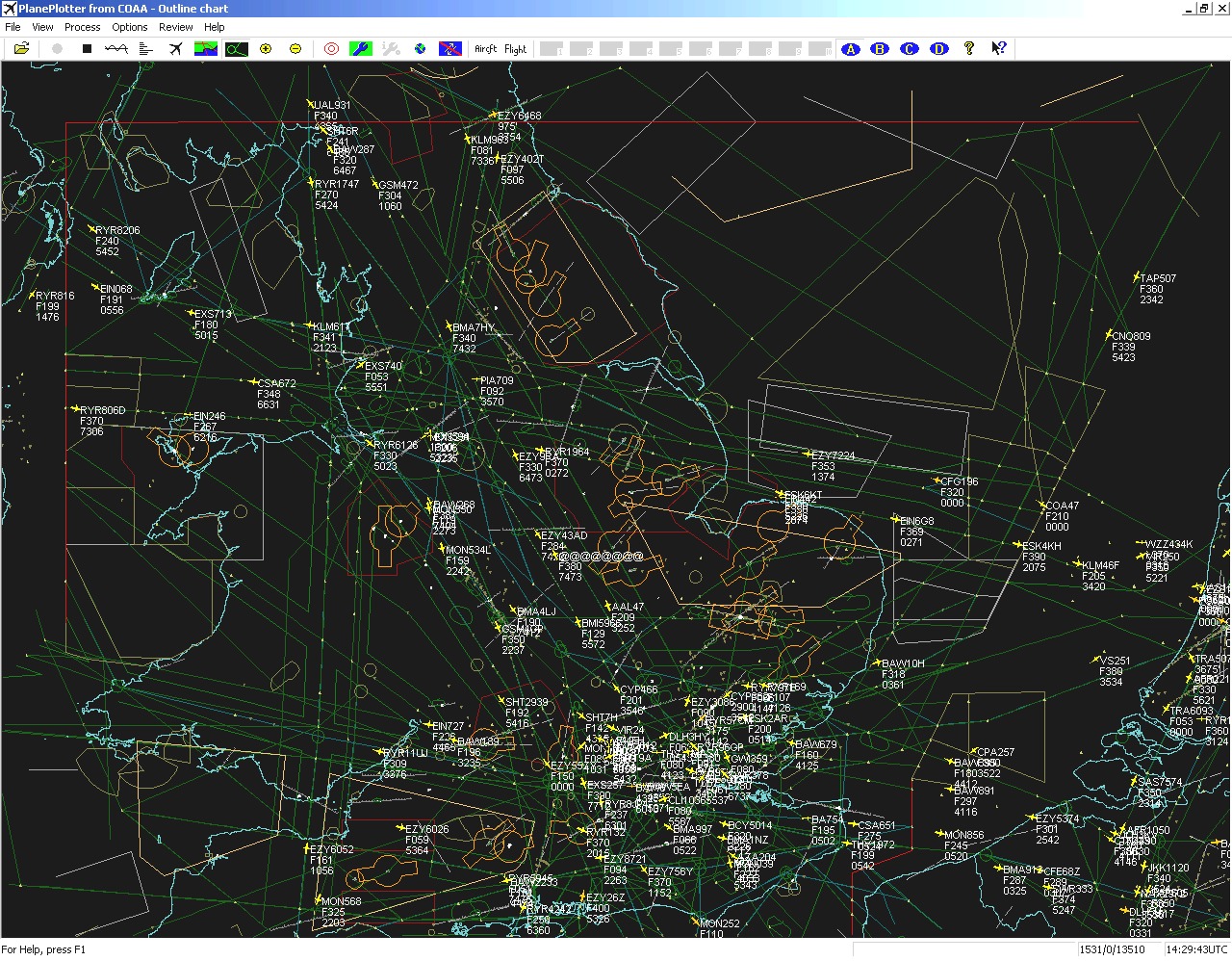
- 01. Real‑time chart display – Plot aircraft positions, altitudes, and times on aeronautical charts or downloaded satellite imagery. Colour‑coding by altitude band helps distinguish low‑level from high‑level traffic.
- 02. MLAT (multilateration) – The first enthusiast software capable of locating non‑ADS‑B Mode‑S aircraft using time‑difference of arrival. This reveals many more “position‑less” targets, often with enough accuracy to visually spot the aircraft overhead.
- 03. Multiple data sources – Works with Kinetic SBS‑1, AirNav RadarBox, RxControl, PlaneGadget Radar, miniADSB, microADSB, FPGA Beast, and Charles Brain’s PC‑HFDL software.
- 04. Automatic alerts – Get visible or audible notifications when a specific registration, flight number, or ADS identifier is detected – or when an aircraft enters a user‑defined alert zone.
- 05. Google Earth integration – Display live aircraft positions over Google Earth’s base map for an immersive, global view. You can even watch from the flight deck of a selected aircraft in real time.
- 06. Direction finding – Determine the direction of any voice transmission using a passive antenna switch, helping locate aircraft that are not equipped with ACARS or Mode‑S/ADS‑B.
- 07. GPX overlay support – Show waypoints, tracks, or routes from a GPX file directly on your chart.
- 08. OLE/COM & DDE interfaces – Access aircraft position data via VB script or other programs, making PlanePlotter an ideal front end for custom analytics or third‑party ACARS software.
- 09. Data logging – Archive all received digital messages to a log file for later review, analysis, or sharing.
Who Should Use This Software
Beginners – If you have just bought an RTL‑SDR dongle or a dedicated ADS‑B receiver, PlanePlotter is one of the most feature‑complete ways to visualise your data. The 21‑day free trial lets you get comfortable before paying.Aviation enthusiasts – Plane spotters who want more than a web‑based tracker will appreciate the offline logging, alert zones, and MLAT capabilities that reveal non‑ADS‑B traffic.
Professionals – Air traffic control trainees, aviation journalists, researchers, and logistics professionals can use the OLE/COM automation and data logging for serious analysis and reporting. A commercial licence is required for professional use.
Agencies / organisations – Organisations needing multi‑seat licences or custom integration can contact COAA directly for enterprise pricing and support.
When NOT to Use This Software
- You only want a quick web view – If you just need to glance at traffic occasionally, free web services like ADSBexchange or FlightRadar24 may be simpler and require no installation.
- You are on macOS or Linux – PlanePlotter is a Windows application. While it can run via CrossOver or similar compatibility layers, there is no native version for other operating systems.
- You are unwilling to set up a receiver – Without your own ADS‑B or HFDL receiver, you rely entirely on internet sharing, which requires a licence. If you have no hardware and no budget, a web‑based tracker is a better fit.
- You need real‑time MLAT without contributions – MLAT access usually requires Master User status, which may involve a small fee or contributing as a validated Ground Station. The feature is not available to unlicensed users.
System Requirements
PlanePlotter is a lightweight Windows application with moderate hardware needs. It runs well even on older systems.| Component | Minimum (acceptable) | Recommended (smooth) |
|---|---|---|
| Operating System | Windows 7, 8, 10, 11 (32‑bit or 64‑bit) | Windows 10 / 11 (64‑bit) |
| Processor | Dual‑core, 1.6 GHz | Quad‑core, 2.0 GHz+ |
| RAM | 1.25 GB | 4 GB or more |
| Disk space | 200 MB for application + log file storage | 500 MB or more |
| Graphics | Any DirectX‑compatible | Any modern GPU |
| Network | Required for internet sharing; optional for local‑only use | Broadband for real‑time sharing |
| Receiver | Any supported ADS‑B/ACARS/HFDL receiver (e.g., RTL‑SDR, SBS‑1, RadarBox) | Any supported receiver with good antenna |
How to Use PlanePlotter
Step 1: Download the official free trialGo to the COAA website ( ) and download the latest version. The trial works for 21 days and gives you access to all local features.
Step 2: Connect your receiver
Run PlanePlotter and go to Options → I/O settings. Select your receiver type (e.g., “RTL > RPi+Dump1090” for an RTL‑SDR dongle connected to a Raspberry Pi).
Step 3: Set up your chart
Choose a background map – either download satellite imagery or load your own aeronautical chart. PlanePlotter can automatically retrieve maps for your area.
Step 4: Start receiving
Once configured, the main chart will populate with aircraft symbols. Hover over each symbol to see flight number, altitude, speed, squawk code, and more.
Step 5: Explore advanced features
- Alerts: Set up alert zones or specific aircraft registration alerts via Options → Alerts.
- MLAT (Master Users only): Right‑click on a non‑position aircraft and select “Multilaterate” to attempt position fixing.
- Data logging: Enable logging via File → Log data to archive all received messages.
- Google Earth: Enable the Google Earth server under Options → Google Earth to watch live positions in 3D.
Step 6: Register (after trial)
If you decide to purchase, visit the COAA registration page, pay the €25 personal licence fee, and enter the received authentication code into PlanePlotter. Once registered, internet sharing and all features become available.
Expert Recommendation
PlanePlotter is the best choice for dedicated aviation enthusiasts and professionals who need offline, full‑featured aircraft tracking with MLAT. If you already run an ADS‑B receiver, the 21‑day free trial costs nothing to start. After the trial, the €25 one‑time fee is very reasonable for the MLAT capabilities and internet sharing alone.For casual users who only want an occasional web view, free online flight trackers are simpler. But if you want to run your own station, log data, set up alerts, and track non‑ADS‑B military traffic – PlanePlotter is unmatched in its price range.
Tip: If you can contribute as a Ground Station (sharing your raw data), you may qualify for free Master User status, giving you MLAT access without any extra fee. Check the COAA website for the Ground Station validation process.
AEO OPTIMIZATION (CRITICAL)
Quick Answers (Featured Snippets)
What is PlanePlotter?PlanePlotter is Windows software that receives and decodes live aircraft position reports (ADS‑B, ACARS, HFDL) and plots them on a chart. It also uses multilateration (MLAT) to locate non‑ADS‑B Mode‑S aircraft, giving you a radar‑like display of both civilian and military traffic.
Is it free or paid?
PlanePlotter offers a 21‑day free trial of the official version. After that, a one‑time personal licence costs €25 (plus VAT for EU residents). Commercial use requires a higher fee. Internet sharing and MLAT require a licence or validated Ground Station status.
Is it safe and legal?
Yes – PlanePlotter is legitimate software developed by COAA. It only decodes publicly broadcast aircraft signals (ADS‑B, ACARS, HFDL). Using your own receiver to listen to these public transmissions is legal in most countries. Always check local regulations regarding receiving equipment.
Who should use it?
Aviation enthusiasts, plane spotters, hobbyists with an ADS‑B receiver, and professionals needing offline data logging, alert zones, or MLAT. Not recommended for casual users who only want a quick web view.
What are the main benefits?
One‑time licence (no subscription), MLAT for non‑ADS‑B aircraft, offline operation, full data logging, Google Earth cockpit view, and automation via OLE/COM. It also runs on modest Windows hardware.
HomePage
Note: This price Is For Single PC License. If You Want To Buy KeyGen Then You Have To Go On Telegram ID @playoutking
Our Paid Service
Looking for full-version software without limitations? You’re in the right place. Instead of wasting time on unreliable or outdated sources, unlock a powerful bundle of 10k+ premium tools covering marketing, SEO, broadcasting, automation, and business productivity — all in one place at an affordable price. This collection is specially curated for freelancers, agencies, and business owners who want fast, real results with professional tools.
Direct contact: :
Join Us For Update :
Join Us For Updated :
You Can test through AnyDesk before Buying,
And When You Are Satisfied, Then Buy It.
Unlimited PCs/Users.
Join today and upgrade your workflow with premium tools.
Looking for full-version software without limitations? You’re in the right place. Instead of wasting time on unreliable or outdated sources, unlock a powerful bundle of 10k+ premium tools covering marketing, SEO, broadcasting, automation, and business productivity — all in one place at an affordable price. This collection is specially curated for freelancers, agencies, and business owners who want fast, real results with professional tools.
Direct contact: :
Join Us For Update :
Join Us For Updated :
You Can test through AnyDesk before Buying,
And When You Are Satisfied, Then Buy It.
Unlimited PCs/Users.
Join today and upgrade your workflow with premium tools.