
Summary
Virtual Audio Cable (VAC) v4.71 is a highly efficient multimedia utility designed to create an internal loopback network of virtual audio playback and recording endpoints on Windows systems. Developed by independent software engineer Eugene V. Muzychenko, this tool acts as a digital patch bay, enabling bit-perfect audio stream transmission between disparate applications in real time without the need for physical hardware modifications.How Virtual Audio Cable Works – The Core Concept
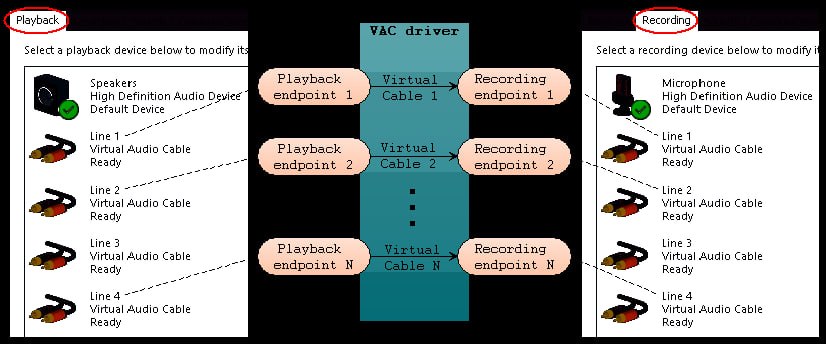
Each side of any Virtual Cable can be used by several audio apps at the same time. If two or more apps play sounds to the same playback endpoint, these sounds are mixed, and the result is transmitted to the recording side. If two or more apps record from the same endpoint, each app gets a copy of the sound. Therefore, each Virtual Cable acts as a meeting point or a logistics hub for applications.The driver and Virtual Cable endpoints work together to create a seamless audio routing environment. Actual names of virtual audio devices that you will see in applications’ menus are different, such as “Line 1”, “Line 2”, etc. The term “Virtual Cable” is used only in the description of VAC product as a placeholder.
Core Technical Changes In v4.71
The v4.71 production branch implements several critical driver and interface refinements. WaveRT Buffering Drivers introduce adjustable minimum Real-Time Audio (WaveRT) buffer factors, forcing clients to use larger, stable buffer pools to eliminate crackling and dropouts on heavy CPU loads. Control Panel Endpoints adds native endpoint mapping labels directly inside the main Cable Information View, allowing easier tracking of default system audio paths.Filter API Queries enhances driver-level programmatic access, allowing automation utilities to poll active audio filters and patch configurations directly. Audio Repeater Updates expands the integrated Audio Repeater KS utility to support strict pin index commands via headless command-line calls.
Primary Operational Use Cases
VAC enables several important audio routing scenarios. Bit-Perfect Signal Routing passes uncompressed digital audio streams directly across apps without introducing quality degradation or unintended volume scaling. Multi-Application Mixing allows multiple independent programs to concurrently write to a single playback channel, automatically mixing the combined inputs cleanly into the targeted recording side.Headless Server Emulation provides a functional virtual sound card architecture for remote servers and virtual machines that lack physical audio processors. VAC delivers audio signals completely inside the computer with no audio hardware required, making it suitable for virtual servers with no audio adapter.
Applications And Use Cases
VAC works with a wide range of audio applications and application classes. Internet Telephony and VoIP applications like Skype, Discord, Ventrilo, and MicroSIP benefit from VAC’s routing capabilities. Live mixing and DJ software such as vMix, Mixxx, VirtualDJ, and VoiceMeeter Banana integrate seamlessly. Live broadcasting tools like Open Broadcaster (OBS Studio), WireCast, VidBlasterX, and SAM Broadcaster use VAC for audio routing.Software synthesizers and studio DAWs including Ableton, Acid, Cakewalk, Cubase, FL Studio, REAPER, and Reason are fully compatible. Audio editors and recorders like Audacity, Adobe Audition, GoldWave, and Sound Forge work with VAC. Virtual Machines including VMware Player, Workstation, VirtualBox, and Hyper-V can also use VAC for audio routing.
FAQ
Q1: What is Virtual Audio Cable (VAC) 4.71?It is a multimedia utility that creates virtual audio devices for routing audio streams between applications on Windows systems.
Q2: How does VAC work?
VAC creates virtual audio devices where output is internally connected to input, creating an audio loopback for applications to route audio between them.
Q3: Is VAC suitable for audiophile applications?
Yes. If no format conversion or volume control is involved, audio transfer is bitperfect with no quality loss.
Q4: What are the system requirements for VAC 4.71?
VAC runs on Windows XP, 7, 8, 10, and 11 with native 32-bit and 64-bit support.
Q5: What audio interfaces does VAC support?
VAC is compatible with Windows Multimedia (MME), DirectSound, Kernel Streaming (KS), and WASAPI audio layers.
Q6: Can multiple applications use the same virtual cable?
Yes. Multiple apps can play to the same playback endpoint with mixing, and multiple apps can record from the same endpoint with copies.
Q7: Does VAC work without physical audio hardware?
Yes. VAC delivers audio signals completely inside the computer with no audio hardware required.
Q8: Is there a free version of VAC available?
Yes. A free Lite edition is available for home environments on the official website.
Q9: What is the Audio Repeater in VAC?
Audio Repeater is a utility that transfers and routes audio signals between endpoints, supporting headless command-line calls.
Q10: Where can I safely download VAC 4.71?
Download exclusively from the official Virtual Audio Cable Download Portal to avoid malware and corrupted signatures.
Technical Specifications
| Specification | Details |
|---|---|
| Software Name | Virtual Audio Cable (VAC) 4.71 |
| Category | Audio Routing and Virtual Audio Device Software |
| Developer | Eugene V. Muzychenko |
| Primary Use | Internal audio stream routing between applications |
| Audio Interfaces | MME, DirectSound, KS, WASAPI |
| Operating Systems | Windows XP, 7, 8, 10, 11 (32-bit and 64-bit) |
| Key Features | Bit-perfect routing, multi-application mixing, Audio Repeater |
| Quality | Bit-perfect with no format conversion or volume control |
| License Type | Commercial (Lite edition available) |
HomePage
Note: This price Is For Single PC License. If You Want To Buy KeyGen Then You Have To Go On Telegram ID @playoutking
Our Paid Service
Looking for full-version software without limitations? You’re in the right place. Instead of wasting time on unreliable or outdated sources, unlock a powerful bundle of 10k+ premium tools covering marketing, SEO, broadcasting, automation, and business productivity — all in one place at an affordable price. This collection is specially curated for freelancers, agencies, and business owners who want fast, real results with professional tools.
Direct contact: :
Join Us For Update :
Join Us For Updated :
You Can test through AnyDesk before Buying,
And When You Are Satisfied, Then Buy It.
Unlimited PCs/Users.
Join today and upgrade your workflow with premium tools.
Looking for full-version software without limitations? You’re in the right place. Instead of wasting time on unreliable or outdated sources, unlock a powerful bundle of 10k+ premium tools covering marketing, SEO, broadcasting, automation, and business productivity — all in one place at an affordable price. This collection is specially curated for freelancers, agencies, and business owners who want fast, real results with professional tools.
Direct contact: :
Join Us For Update :
Join Us For Updated :
You Can test through AnyDesk before Buying,
And When You Are Satisfied, Then Buy It.
Unlimited PCs/Users.
Join today and upgrade your workflow with premium tools.